Intune & Windows Autopilot Lock Removal: Complete ITAD Decommissioning, Graph API & Proof-of-Ownership Playbook
The corporate Windows OOBE lock screen ("Welcome to [Organization]! Sign in with your work or school account") is the single costliest bottleneck for laptop refurbishers, ITAD facilities, and enterprise sysadmins handling off-lease fleets. Wiping the NVMe SSD to NIST SP 800-88 standards or swapping in a brand-new drive has zero effect. In this engineering guide, we dissect the cryptographic architecture of the 4K Hardware Hash, distinguish the 3 distinct MDM lock states, and detail the official procedures to clear them permanently.
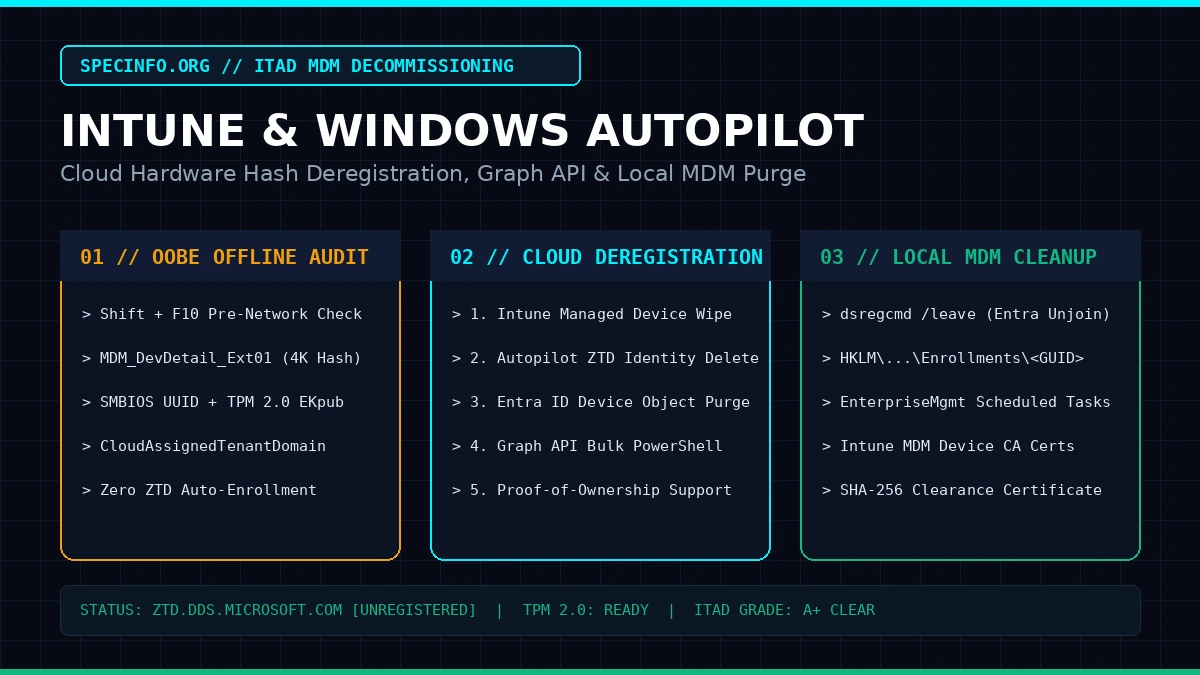
1. Why Recycled Enterprise Laptops Are Locked & Why Rufus Offline Bypass Is a Refurbisher Trap
Unlike legacy BIOS supervisor passwords or local OS accounts, Windows Autopilot does not store its lock state on the SSD. When an enterprise device is enrolled into Zero-Touch Deployment (ZTD), Microsoft's cloud deployment service (ztd.dds.microsoft.com) records a 4K Hardware Hash — a 4,000-byte telemetry blob extracted via the MDM_DevDetail_Ext01 WMI/CIM class.
- Orphaned Cloud Profiles After Accounting Write-Off: Corporations retiring laptops close their accounting depreciation records and hand batches over to ITAD recyclers (via Waste Transfer Notes / Asset Disposal Certificates), treating the hardware as non-existent — while forgetting to delete the serial numbers from Microsoft Intune / Entra ID.
- The Azure Billing Model Myth: Whether the former enterprise uses an Azure Pay-As-You-Go subscription or an annual Enterprise Agreement has zero impact on the hardware lock. The ZTD record remains active on Microsoft's servers indefinitely.
- Why Rufus Offline Bypass Is a Customer RMA Trap: Using Rufus ("Remove requirement for an online Microsoft account") and installing Windows offline creates a temporary local account. However, the moment your retail buyer performs a "Reset this PC" with Wi-Fi enabled six months later, Windows queries
ztd.dds.microsoft.com, locks the screen to the former corporation, and triggers a costly customer return/refund dispute.
That 4K Hardware Hash cryptographically binds identifiers fused into the motherboard:
- SMBIOS System UUID & Serial Number (Service Tag): Stored in the DMI/SMBIOS structures of the UEFI ROM.
- Motherboard BaseBoard Serial Number: Factory PCB serial identifier.
- TPM 2.0 Endorsement Key Public Certificate (EKpub): A cryptographic certificate in the processor security module (Intel PTT / AMD fTPM) or discrete dTPM chip.
2. The Hidden Margin Paradox: SMART-2.0.0.14.exe (SMART DPK & MAR Licensing) vs. Zero-Cost ($0) In-House Method
Across the refurbishment industry, many companies rely on SMART Client (SMART-2.0.0.14.exe) from the SMART DPK platform combined with wholesale MAR (Microsoft Authorized Refurbisher) licenses. While the SMART DPK Pay-As-You-Go plan has a $0/month fixed fee (charging only per consumed Windows Home/Pro MAR key) and automatically overwrites the old Autopilot history with a new digital identity, it hides a massive profit drain:
- Enterprise Laptops ALREADY Have a Paid Windows Pro License in the Motherboard! Nearly every off-lease business laptop (Dell Latitude, Lenovo ThinkPad, HP EliteBook) already contains a genuine factory Windows Pro OEM digital key embedded in the UEFI/BIOS ACPI MSDM table. You can extract it in a split second via PowerShell:
# Extract the factory OEM Windows Pro key embedded in the motherboard ACPI MSDM table ($0 cost)
(Get-CimInstance -ClassName SoftwareLicensingService).OA3xOriginalProductKey- Paying Twice for What the Motherboard Already Owns: When you spend $6 to $15 per laptop on a MAR key in SMART DPK just to clear an Autopilot profile, you lose ~$500 (~2,000 PLN) in net profit on a 50-laptop batch and ~$2,000 (~8,000 PLN) on a 200-laptop batch!
Keep your SMART DPK account, but enforce a strict cost-filtering rule:
1) 90% of Volume ($0 Zero-Cost Pipeline): Use bulk cloud deregistration (3-line script for the former IT admin or bulk Microsoft Support PoP ticket) combined with our free automated USB deployment workflow (extracting the BIOS
OA3xOriginalProductKey + autounattend.xml + CustomRecovery.wim). License cost: $0.2) 10% Exceptions (SMART-2.0.0.14.exe): Reserve paid SMART Client MAR keys strictly for laptops lacking an ACPI MSDM key in BIOS (originally sold with FreeDOS/Linux) or public sector tenders explicitly requiring a physical MAR COA sticker.
3. Diagnostic Triage Matrix & The 10-Second Batch LAN Test (Pile A vs. Pile B)
In real-world ITAD recycling batches, only 20% to 40% of laptops actually have an active Autopilot lock — the remaining 60%–80% were properly deregistered before disposal. Before wasting hours on clean units, perform the 10-Second LAN Triage (Pile A vs. Pile B) and classify the exact lock type:
- 10-Second Live LAN Triage at First OOBE Screen: Plug an active Ethernet (LAN) cable into the laptop at the initial Windows language/region setup screen and click Next. If it displays "Welcome to [Company Name] – Enter your work or school email" → place on Pile A (Locked). If it displays the standard consumer Microsoft account login → place on Pile B (100% Clean — zero tickets or scripts needed!).
| Lock Classification | Symptom in Windows / OOBE | Root Cause | Permanent Zero-Cost ($0) Resolution |
|---|---|---|---|
| Type A: Active Cloud Windows Autopilot Profile (ZTD) | After a clean OS install and connecting to the internet during OOBE, the screen locks to a corporate tenant login (user@company.com). |
Microsoft Cloud (ztd.dds.microsoft.com) still holds the 4K Hardware Hash under the previous owner's Autopilot deployment devices. |
3-Line Graph Script via Former IT Admin OR Official Microsoft Support Proof of Ownership Ticket (CSV + PoP) OR Bench OEM/Custom Recovery Flow. |
| Type B: Stale Local Intune MDM Enrollment (Orphaned Registry) | Windows boots to the desktop, but Settings → Accounts → Access work or school shows a stuck corporate account or policies block USB/settings. | The device was deleted from the cloud tenant while offline, leaving orphaned HKLM\SOFTWARE\Microsoft\Enrollments keys and scheduled tasks locally. |
100% removable locally without formatting! Purge MS DM Server registry trees, EnterpriseMgmt tasks, and MDM certs. |
| Type C: Local Entra ID / Workplace Join (No Autopilot Hash) | A previous user signed into Microsoft 365 apps and checked "Allow my organization to manage my device" without Autopilot ZTD registration. | Local Primary Refresh Token (PRT) and Entra ID registration only; no 4K Hardware Hash registered in Autopilot ZTD. | Execute dsregcmd /leave as Administrator or perform a clean Windows installation. |
4. The Two Warehouse Intake Scenarios: Pre-Listed S/Ns vs. Bulk Unlisted Pallets ("50 kg of Electronics")
Your fastest zero-cost unlocking workflow depends on whether the disposing organization provided an itemized Serial Number list:
Scenario 1: You Have the Serial Number List from the Disposing Company (3-Minute Path Without Unpacking Boxes)
An itemized Serial Number / Service Tag list on the transfer protocol or Excel sheet is operational gold, unlocking two immediate $0 options:
- Option A (Fastest — 3-Line PowerShell Script for the Former IT Admin): The disposing company's IT administrator can purge 50, 100, or 500 laptops from Intune in 3 minutes without touching the hardware. For their IT security team, purging retired serial numbers cleans up license counts and satisfies audit compliance. Simply email their helpdesk the ready-to-run 3-line Microsoft Graph PowerShell command (included in the toolkit below).
- Option B (Bulk Microsoft Support Ticket with S/N List): If the company is unreachable, open a free ticket via Microsoft Support for Business or
admin.microsoft.com(Deregister Windows Autopilot device), attaching the signed transfer protocol listing the S/Ns and your exported CSV.
Scenario 2: You Receive a Bulk Pallet WITHOUT Recorded S/Ns (e.g., "30 Laptops" or "150 kg of Electronics" on Waste/Transfer Note)
Microsoft Support engineers enforce strict anti-theft rules and automatically reject generic bulk invoices or waste notes ("50 kg of electronics") that lack explicit Serial Numbers. Here is how to legalize an unlisted pallet for $0 in minutes:
- Rapid 1D/2D Barcode Scan (3 Seconds/Unit) or USB BIOS Dump: Instead of typing serials manually, scan the bottom chassis Service Tag / S/N barcodes into
serials_list.txtusing a USB barcode scanner (or smartphone Barcode to PC app). If bottom stickers are worn off, plug a service USB drive into the OOBE screen (Shift + F10) to append BIOS serials and 4K Hardware Hashes into a single batch CSV:
# Execute in OOBE (Shift + F10 -> powershell) with USB drive D: inserted
# 1. Instant 2-second BIOS Serial Number append to batch list
wmic bios get serialnumber >> D:\batch_serials.txt

# 2. Or export official 4K Hardware Hashes into a single cumulative CSV for Microsoft Support
Set-ExecutionPolicy -Scope Process -ExecutionPolicy Bypass -Force
Install-Script -Name Get-WindowsAutoPilotInfo -Force
Get-WindowsAutoPilotInfo.ps1 -OutputFile D:\AutopilotDeregistration.csv -Append- The "Annex No. 1 to Transfer / Waste Protocol" Legalization Trick ($0 Proof of Ownership): Paste the scanned S/N list into a 1-page document titled "Annex No. 1 to Asset Transfer / Waste Note dated [DATE] — Itemized Serial Number Schedule" and email it to the supplier asking for a brief email confirmation of receipt. That confirmed annex serves as a 100% valid Proof of Ownership (PoP) accepted by Microsoft Support!
5. 4 Zero-Cost ($0) Bench Methods: From 60-Second Keyboard Break to Factory Recovery Lock-In
When an off-lease laptop is already sitting on your repair bench displaying "Welcome to [Company Name]", you do not need to wait for Microsoft Support or pay for third-party tools. Follow these verified $0 bench remediation procedures:
ztd.dds.microsoft.com.
Method 1: 60-Second OOBE Keyboard Breakout to Clean Local Desktop (Shift + F10)
If Windows has already reached the corporate login screen, you can bypass the cloud gate and jump directly into a fully functional local administrator desktop without reformatting the drive:
- On the "Welcome to [Company Name]" screen, press
Shift + F10(orFn + Shift + F10on HP/Lenovo) to open an administrative Command Prompt. - Execute the following commands sequentially to create a local administrator user, clear the cached cloud provisioning tokens, and zero out the OOBE setup flags:
# 1. Provision a local administrator account
net user User Pass123 /add
net localgroup Administrators User /add

# 2. Wipe cached Autopilot policies and OOBE JSON profiles
del /f /q /s "C:\Windows\System32\oobe\info\*.*"
reg delete "HKLM\SOFTWARE\Microsoft\Provisioning\AutopilotPolicyCache" /f

# 3. Terminate OOBE setup sequence flags in registry
reg add "HKLM\SYSTEM\Setup" /v OOBEInProgress /t REG_DWORD /d 0 /f
reg add "HKLM\SYSTEM\Setup" /v SetupPhase /t REG_DWORD /d 0 /f
reg add "HKLM\SYSTEM\Setup" /v SetupType /t REG_DWORD /d 0 /f
reg add "HKLM\SYSTEM\Setup" /v SystemSetupInProgress /t REG_DWORD /d 0 /f

# 4. Immediate reboot to local desktop
shutdown /r /t 0
Method 2: Free In-House SMART Client Replacement (Zero-Touch USB + Custom Recovery WIM)
Commercial MAR platforms charge $6 to $15 per unit for automated deployment. You can replicate this entire workflow in-house for $0 using native Windows imaging and deployment tools:
- Automated USB Installer: Copy
autounattend.xmlto the root directory of your Windows 11 installation media. It automatically skips cloud OOBE network prompts, provisions a local admin account, and activates Windows Pro from the BIOSOA3xOriginalProductKeyfor $0. - Endpoint Shielding (Hosts & Tasks): Prevent future background cloud queries by redirecting ZTD endpoints to localhost and disabling the Intune scheduled enrollment engine:
# Append ZTD telemetry nullification to hosts file
Add-Content -Path "$env:windir\System32\drivers\etc\hosts" -Value @"
127.0.0.1 ztd.dds.microsoft.com
127.0.0.1 cs.dds.microsoft.com
127.0.0.1 enterpriseenrollment.manage.microsoft.com
"@

# Disable scheduled background enrollment triggers
schtasks /change /tn "\Microsoft\Windows\EnterpriseMgmt\Enrollment" /disable
schtasks /change /tn "\Microsoft\Windows\EnterpriseMgmt\PushRouting" /disable- Permanent Custom Recovery Image (
reagentc): To prevent customer returns when a retail buyer performs a "Reset this PC" months later, seal a clean Windows image into the local recovery partition:
mkdir C:\Recovery
dism /Capture-Image /ImageFile:C:\Recovery\CustomRecovery.wim /CaptureDir:C:\ /Name:"Clean-Refurb-Image"
reagentc /setosimage /path C:\Recovery /index 1
reagentc /enable
Method 3: OEM DMI Service Utilities & Motherboard UUID / TPM Reset
For motherboard refurbishment labs and component-level repair benches, hardware identity can be updated at the firmware layer:
- Dell (Dell Command | Configure — CCTK): In BIOS setup (
F2 → Security → TPM 2.0 Security), enable PPI Bypass for Clear Commands and execute Clear TPM. In WinPE, runcctk.exe --asset=Refurb-PC. - Lenovo ThinkPad: Boot the official Lenovo Hardware Maintenance USB (Golden Key) → select
1 - Set System Identification→ generate a new SMBIOS UUID to break hash correlation. - HP Inc.: Execute
WNDMIFIT(from the HP NBDMIFIT service suite) on repaired system boards to clear MPM (Manufacturing Programming Mode) and randomize UUID.
6. Legal Protection & Commercial B2B Warranty of Title (Sale of Goods Act / UCC)
When an equipment broker or leasing company sells laptops with active Autopilot locks and refuses to cooperate, they commit a direct Breach of Warranty of Title (Legal Defect).
In commercial law (including Art. 556³ of the Polish Civil Code, the UK Sale of Goods Act 1979 / Consumer Rights Act, and the US Uniform Commercial Code § 2-312), a vendor is legally obligated to deliver goods free of third-party security claims and cryptographic cloud controls. An unreleased Autopilot lock constitutes an incurable defect that warrants an immediate full refund or formal chargeback.
7. The Golden 90/10 Rule for Maximum ITAD Profit Margins
By standardizing your refurbishment pipeline, you eliminate unnecessary software license costs:
- 90% of Units: Process through the $0 pipeline: 10-second LAN triage → BIOS
OA3xOriginalProductKeyextraction → automated USBautounattend.xmlinstallation → bulk Microsoft Support deregistration ticket. Cost: $0. - 10% of Units (Exceptions): Reserve paid MAR keys (
SMART-2.0.0.14.exe) strictly for units originally shipped without a Windows Pro license (FreeDOS/Linux) or enterprise tenders requiring a physical MAR paper COA sticker.
High-Throughput Bench Gear for Autopilot Auditing & Tenant Administration
Speed up 50-laptop batch intake, offline OOBE diagnostics (Shift+F10), MDM CAB log extraction, and secure Microsoft Graph API administration with industrial bench hardware:
Download the Complete ITAD MDM & Autopilot Decommissioning Toolkit (v2026.1)
Save 10+ hours of lab engineering: instant digital download containing all 4 pre-compiled PowerShell scripts, the zero-touch autounattend.xml USB answer file, 5-in-1 interactive legal generator, and printable 300 DPI A4 SOP playbooks & clearance certificates.