How to Build & Organize a Dedicated SAS Drive Wiping Station for Aiken Workbench (HBA, Trayless Cages & 24-Bay JBOD)
In Part 3 of our Enterprise ITAD Series, we solved why SAS drives fail to appear in the OS (motherboard SATA vs. SAS HBA wiring, NetApp/EMC 520-byte sector formatting via sg_format, and Pin 3 PWDIS reset). Now comes the practical floor question every ITAD technician asks: how do you wipe, format, and grade hundreds of loose enterprise SAS drives in a separate machine without booting a loud, 30 kg 2U rack server for 6 minutes every single time? Here is the complete hardware blueprint for building and organizing a standalone 15-second-booting SAS Wiping & Unlocking Station for Aiken Workbench.
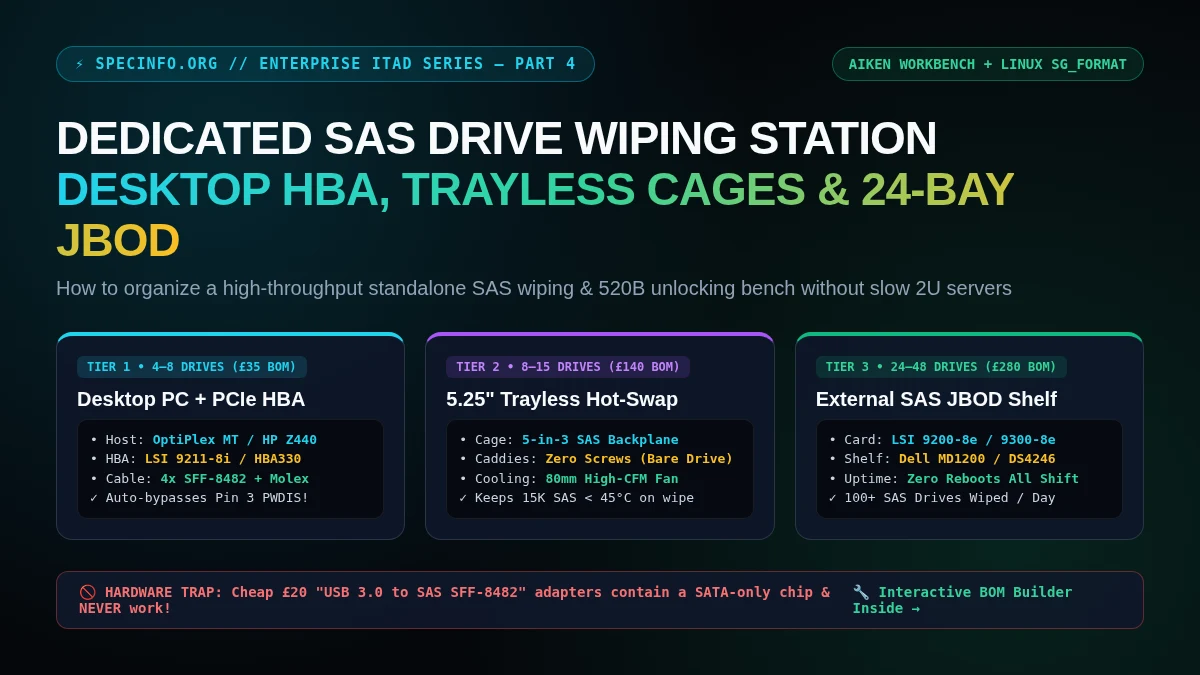
🛠️ Interactive SAS Wiping Station Builder & BOM Calculator
Select your daily SAS drive volume to generate the exact hardware Bill of Materials (BOM), cabling, cooling spec, and Aiken PXE + Linux setup (100% client-side RAM):
🖥️ Tier 1 Build: Standard Desktop Tower PC + PCIe IT-Mode HBA + 4x SFF-8482 Molex Breakout (~£35–£55 Upgrade)
The fastest and cheapest way to wipe 4 to 8 loose SAS drives at a time. Uses any surplus office Tower PC on your bench that boots into Aiken PXE in 15 seconds—with automatic Pin 3 PWDIS bypass built into the Molex cable.
1. Why Wiping Loose SAS Drives Inside 1U/2U Rack Servers Kills ITAD Throughput
When pallets of loose enterprise 3.5-inch and 2.5-inch SAS drives arrive on the ITAD floor—pulled from decommissioned SAN arrays, blade enclosures, or customer RMA bins—many facilities use a spare 1U or 2U rack server (such as a Dell PowerEdge R720/R730 or HPE ProLiant DL380) as their drive wiping machine.
While that works for full-server auditing, using a rack server just to wipe loose drives creates four massive operational bottlenecks:
- The 6-Minute Reboot Penalty: Every time a technician powers down or reboots an enterprise server between drive batches, ECC memory training, iDRAC/iLO initialization, and PERC/Smart Array bus scanning burn 4 to 7 minutes of dead bench time.
- Proprietary Caddy Screw Labor: You cannot slide a bare SAS drive into a Dell or HPE server bay without screwing it into a proprietary plastic/metal caddy first. Screwing and unscrewing 4 screws per drive across 200 drives wastes hours of technician labor every week.
- Noise & Power Consumption: A 1U/2U rack server draws 180W–350W at idle and screams at 75–85 dB under load, turning the test bench into an acoustic hazard.
- Hardware RAID Interference: If someone swaps a RAID controller or resets BIOS defaults, the server reverts to RAID Mode and halts on "Foreign Configuration Found."
2. Hardware Warning: Why £20 "USB 3.0 to SAS (SFF-8482)" Adapters on Amazon/eBay Are a Scam
When technicians look for an easier way to plug SAS drives into an existing Aiken desktop PC, their first instinct is to search Amazon or eBay for a "USB 3.0 to SAS Adapter" or "SFF-8482 to USB Dock". Dozens of listings appear for £15 to £28 showing a wide 29-pin SFF-8482 socket with a 12V power brick.
Inside 99% of inexpensive "SFF-8482 to USB 3.0" adapters sits a £1.50 consumer USB-to-SATA bridge chip (such as the JMicron JMS578 or ASMedia ASM1153E). The manufacturer simply soldered a wide 29-pin SFF-8482 plastic connector onto a SATA board so the unbroken SAS bridge key fits physically! When you plug in an enterprise SAS drive, the 12V brick spins up the motor, but the USB chip speaks only the ATA/SATA command set—it lacks a SAS initiator and cannot speak the SCSI protocol at all. True industrial USB-to-SAS hardware bridges (such as forensic units from ATTO or Crucial Forensics) cost £250 to £450+ per single drive port.
Instead of wasting money on fake USB adapters, you can build a native, full-speed 12Gb/s SAS Wiping Station inside a standard desktop PC for under £35 using genuine enterprise PCIe HBA silicon.
3. Three Proven SAS Wiping Station Builds for Aiken Workbench
Because Aiken Workbench boots a Linux kernel over PXE that already contains built-in enterprise SCSI/SAS HBA drivers (mpt2sas and mpt3sas), any standard desktop PC becomes a native SAS wiping rig the moment you drop a non-RAID PCIe SAS HBA card into its motherboard.
| Station Tier & Capacity | Exact Hardware Bill of Materials (BOM) | Est. UK Cost | Key Engineering Advantage |
|---|---|---|---|
| Tier 1: Desktop PC + PCIe HBA + "Octopus" Cable (4 to 8 SAS Drives / Batch) |
• Host PC: Dell OptiPlex 7050/7060 MT, HP EliteDesk 800 G3/G4 TWR, or HP Z240/Z440 • PCIe x8 Card: LSI 9211-8i / 9300-8i IT-Mode Bundle ↗ (flashed in IT-Mode with cables) • Breakout Cable: 1x or 2x Mini-SAS (SFF-8087 or SFF-8643) to 4x SFF-8482 SAS with 4-Pin Molex Power
|
£35 – £55 (excluding surplus PC) |
✅ 15s PXE Boot + Automatic Pin 3 PWDIS Fix: Boots Aiken 20× faster than a rack server, and powering drives via 4-Pin Molex automatically eliminates the +3.3V Pin 3 reset lock! |
| Tier 2: 5.25" Trayless Hot-Swap Tower Rig (5 to 15 SAS Drives / Batch) |
• Host Chassis: Tower PC or 4U ATX Case with 3× to 9× external 5.25" DVD bays• Hot-Swap Cage: ICY DOCK TurboSwap / FatCage SAS/SATA ↗ (Trayless 5.25" Enclosure with active cooling) • HBA: LSI 9300-8i or 9300-16i (IT-Mode)
|
£120 – £185 | ✅ Zero Caddies, Zero Screws & Active Cooling: Slide bare 3.5" SAS drives straight into the front doors like VHS tapes. Built-in 80mm fan prevents 15K RPM thermal shutdowns. |
| Tier 3: Desktop PC + External 24-Bay JBOD Shelf (24 to 48+ SAS Drives / Batch) |
• Host PC: Any Desktop PC running Aiken PXE • External HBA: LSI 9200-8e (SFF-8088) or LSI 9300-8e (SFF-8644) IT-Mode• JBOD Shelf: Dell PowerVault MD1200 (12×3.5"), MD1220 (24×2.5"), NetApp DS4246 (24×3.5"), or Lenovo SA120
|
£220 – £380 | ✅ 100–300+ Drives Per Shift: The PC stays booted into Aiken all day. Pull wiped drives out live, slide 24 new drives in, click Rescan in Aiken, and wipe continuously with zero reboots. |
3.1. The Tier 1 Secret: Why a 4-Pin Molex SAS Breakout Cable Solves TWO Problems at Once
When ordering a breakout cable for a desktop HBA card, never buy a standard SATA breakout cable (SFF-8087 to 4x SATA)—SATA connectors have an L-shaped key that cannot plug into a SAS drive! You must order a Forward SAS Breakout Cable:
- For SAS-2 HBAs (
LSI 9211-8i,Dell H310): OrderMini-SAS SFF-8087 (Host) to 4x SFF-8482 SAS (Target) with 4-Pin Molex Power. - For SAS-3 HBAs (
LSI 9300-8i,Dell HBA330): OrderMini-SAS HD SFF-8643 (Host) to 4x SFF-8482 SAS (Target) with 4-Pin Molex Power.
Remember the Pin 3 PWDIS (+3.3V Power Disable) lock from Part 3 that prevents modern 8TB–22TB HGST/WD Ultrastar drives from spinning up? A standard ATX SATA power plug has 5 wires (+12V Yellow, +5V Red, +3.3V Orange, and 2× Black Ground). However, a classic 4-Pin Molex connector has ONLY 4 wires (+12V Yellow, +5V Red, and 2× Black Ground)—it has ZERO +3.3V orange wire! When you buy an SFF-8482 breakout cable powered by 4-Pin Molex (or power a 5.25" hot-swap cage via Molex), Pin 3 receives
0.0V by default. Every modern PWDIS enterprise drive spins up immediately without ever needing Kapton tape!
3.2. Thermal & Power Rules on the Desktop SAS Bench (Preventing 65°C Trips & Melted Splitters)
When moving enterprise SAS drives out of a high-airflow server and onto a desktop workbench, you must enforce two physical safety rules:
- Mandatory Active Airflow Over Both the Drives AND the PCIe HBA Heatsink: Enterprise 10,000 RPM and 15,000 RPM SAS drives—as well as the Broadcom/LSI SAS2008/SAS3008 chip on your PCIe HBA card—are engineered for server chassis with high-static-pressure fans. Left bare on a desk with zero airflow during a 2-hour NIST 800-88 wipe, a 15K SAS drive will climb past 62°C–68°C and abort the wipe with S.M.A.R.T. thermal errors, while an uncooled LSI HBA heatsink can hit 85°C+ and reset the PCIe bus. Fix: Zip-tie a quiet 40mm fan onto the PCIe HBA heatsink, and place a 120mm USB/12V fan blowing directly across the drives on your silicone mat.
- Never Use Cheap "Molded" Molex-to-SATA Power Adapters: In the ITAD industry, there is a famous saying: "Molex to SATA, lose all your data." Cheap injection-molded power splitters can short internally under the heavy 2.0A–2.5A 12V spin-up surge of 4 enterprise SAS drives. Always use crimped-pin (individual plastic housing) power connectors and ensure your desktop PC has at least a 450W–550W 80+ Bronze PSU if spinning up 8 SAS drives simultaneously.
4. How to Organize the Physical SAS Wiping Workbench (4-Zone Flow & Dual-Boot SOP)
A high-output SAS wiping station is not just a pile of cables—it is a structured factory cell. If technicians mix untested 520-byte NetApp drives with wiped 512-byte drives on the same table, batch times double. Here is the proven 4-Zone Bench Layout used by top UK & European ITAD facilities:
🟡 Zone 1: Inbound Triage & Connector Check
Inspect the 29-pin SFF-8482 gold fingers for cracked plastic bridges, check label for SAN OEM marks (NetApp, EMC, Hitachi 520B), and sort by 3.5" LFF vs. 2.5" SFF.
🔵 Zone 2: Linux 520B → 512B Unlock Mode
If drives come from a NetApp/EMC SAN array, boot the station PC from the permanently plugged-in Ubuntu Live-USB and run the parallel sg_format --size=512 batch script.
🟢 Zone 3: Aiken PXE Wipe & S.M.A.R.T. Audit
Boot the station PC into Aiken Workbench (or keep it booted 24/7 in HBA hot-swap mode). Run NIST SP 800-88 Clear/Purge and verify 0 Grown Defects.
🟣 Zone 4: Zebra ZPL Labeling & ESD Packing
Print the thermal ZPL audit label right at the bench (Model, Capacity, Serial, Sector Size 512B, Health 100% PASS) and bag into ESD shielding.
4.1. One-Command Parallel 520B-to-512B Unlock Script for Your Station's Linux USB
Keep a £5 32GB USB 3.0 flash drive with Ubuntu Live (Persistent Mode) plugged into a rear USB port of your SAS Wiping PC. Whenever a pallet of NetApp, Dell EMC, or Hitachi 520-byte drives arrives, boot into the USB stick and run this single script to detect and unlock all 520B/528B SAS drives across every connected bay in parallel:
sudo apt-get update && sudo apt-get install -y sg3-utils lsscsi
for dev in $(lsscsi -g | grep -v "ATA" | awk '{print $NF}' | grep "/dev/sg"); do
 if sudo sg_readcap "$dev" 2>/dev/null | grep -qE "520 bytes|528 bytes"; then
 echo "🔓 Unlocking 520B/528B SAN drive $dev -> 512B in background..."
 sudo sg_format --format --size=512 --fmtpinfo=0 "$dev" > "/tmp/format_$(basename $dev).log" 2>&1 &
 fi
done
echo "✅ All 520B SAS drives formatting in parallel! Watch progress: tail -f /tmp/format_sg*.log"Once the parallel format completes, reboot the PC into Aiken Workbench over PXE (or rescan the SCSI bus): every single drive now reports full capacity with standard 512-byte sectors, ready for certified NIST 800-88 sanitization and resale!
Standardize Your Bench with Official SpecInfo ITAD & Linux Rescue Toolkits
Equip your technicians with our printable 300 DPI A4 engineering runbooks, MDM/Autopilot decommissioning scripts, and Zebra ZPL thermal label templates.