FIDO2 Hardware Security Keys (YubiKey 5C NFC) & PIN-Encrypted Drives (IronKey / iStorage): Defeating AiTM Phishing
Most people think enabling 6-digit SMS or Google Authenticator codes makes their Google, banking, Microsoft 365, or password manager accounts unhackable. Modern Adversary-in-the-Middle (AiTM) phishing kits capture your password, your 6-digit code, and your live session cookie in under one second—bypassing app 2FA cleanly. Here is how dedicated silicon—FIDO2 hardware security keys backed by the 3-2-1 "Never Buy One Key" rule plus OS-independent keypad PIN USB drives—locks attackers out permanently.
🚨 CRYPTO-ERASE & SELF-LOCKOUT WARNING (READ BEFORE ENROLLING)
Hardware security operates without a "Forgot PIN" safety net. On keypad-encrypted drives like Kingston IronKey and iStorage datAshur, 10 consecutive wrong PINs triggers irreversible silicon crypto-erasure—permanently destroying the internal encryption key. Equally, removing weak SMS fallback with only one YubiKey enrolled means losing your keychain can lock you out of primary accounts for weeks. Always enroll at least two FIDO2 keys simultaneously and store printed recovery codes offline.
1. Why 6-Digit Codes Fail Against Modern AiTM Phishing (And How FIDO2 Stops It Cold)
For years, cybersecurity advice stopped at: "Turn on two-factor authentication via SMS or an authenticator app." That worked well against simple leaked passwords. Today, however, attackers don't just collect passwords on static fake forms—they deploy automated Adversary-in-the-Middle (AiTM) phishing proxies.
Think of an AiTM site like an invisible glass relay booth sitting between you and your real bank or cloud login:
- You click a realistic alert link in an email (for example,
micr0soft-security-check.comor a subtle lookalike domain). - The proxy fetches the real Microsoft or Google login screen live and mirrors it back to your browser.
- You type your password and enter the fresh 6-digit code from your phone's Authenticator app or SMS.
- In less than half a second, the attacker's relay forwards both pieces straight to the real server, receives the active logged-in session cookie, and locks you out—no matter how fast your 30-second timer refreshes.
How a Hardware FIDO2 Key Breaks the Attack in Silicon
A FIDO2 / WebAuthn security key (like a YubiKey 5C NFC) never relies on your eyes to spot a fake web address. Instead, your browser sends the cryptographic origin of the active tab directly down the USB or NFC connection to the hardware chip.
Inside the chip, your private key is permanently bound to the authentic origin (login.microsoftonline.com or accounts.google.com). If an attacker swaps even a single letter or routes you through a proxy server, the cryptographic challenge doesn't match the key stored in silicon. The blinking gold disc refuses to unlock—even if you physically touch it.
SMS & 6-Digit Authenticator Codes
You can be tricked into typing a 6-digit code onto a convincing proxy domain. Once forwarded live, session tokens are hijacked even without stealing your phone.
Domain-Bound Hardware Security Key
Zero 6-digit codes to copy-paste. Your YubiKey verifies the exact browser domain inside tamper-resistant hardware and requires a real finger touch to sign.
Never Own Just One Key
Losing your keys on a train with only one enrolled YubiKey can mean permanent lockout. Always buy at least two keys together: 1 daily EDC + 1 fireproof spare.
🧮 3-2-1 FIDO2 Hardware Key & PIN Storage Architect (+ SSH ed25519-sk Generator)
Configure your threat profile, host ports, SSH usage, and target budget currency to map your fault-tolerant key fleet and generate copy-paste Linux hardware SSH setup commands.
# SpecInfo Phishing-Proof Linux SSH Hardware Key Setup (Requires OpenSSH 8.2+)
# Step 1: Plug in your PRIMARY YubiKey / FIDO2 key and generate a hardware-backed resident key
ssh-keygen -t ed25519-sk -O resident -O verify-required -C "primary-yubikey-5c" -f ~/.ssh/id_ed25519_sk_primary

# Step 2: Plug in your BACKUP SPARE key so a lost keychain never locks you out of servers!
ssh-keygen -t ed25519-sk -O resident -O verify-required -C "backup-safe-yubikey" -f ~/.ssh/id_ed25519_sk_backup

# Step 3: Copy BOTH .pub keys to your server's ~/.ssh/authorized_keys
ssh-copy-id -i ~/.ssh/id_ed25519_sk_primary.pub user@your-server-ip
ssh-copy-id -i ~/.ssh/id_ed25519_sk_backup.pub user@your-server-ip

# Optional: On a fresh machine, recover key handles directly from the USB key:
# ssh-keygen -K
2. Choosing Your FIDO2 Key Pair: YubiKey 5C NFC vs Security Key C NFC vs Nitrokey
Yubico's lineup confuses many first-time buyers because two keys look almost identical yet carry different internal firmware capabilities. Making the right choice upfront saves buying twice—especially since we are buying in pairs of two or three:
- The Black YubiKey 5 Series (
5C NFCUSB-C /5 NFCUSB-A): The gold standard for engineers, system administrators, and power users. Beyond standard FIDO2 passkeys and Linux SSH (ed25519-sk), the 5-series chip adds hardware-stored 6-digit TOTP codes (for stubborn websites that haven't adopted FIDO2 yet—viewable in Yubico Authenticator only when you tap the key!), OpenPGP commit/email signing, corporatePIVsmartcards, and static challenge-response slots for Bitwarden/KeePassXC. - The Blue Security Key Series (
Security Key C NFC/Security Key NFC): Costs roughly half as much per key while providing the exact same unbreakable FIDO2/WebAuthn passkey and Linux SSH security. What does it drop? Legacy TOTP app storage, OpenPGP, and corporate smartcards. If you only need phishing-proof protection for Gmail, Microsoft 365, Apple ID, GitHub, Cloudflare, and your password manager—or want an ultra-affordable third backup key to stash in a bank deposit box or relative's safe—the blue Security Key C NFC is unbeatable value. - Open-Source Alternatives (Nitrokey 3 & Token2): Prefer fully auditable open-source hardware and firmware with USB-C + NFC? Nitrokey 3C NFC offers transparent open-source FIDO2, OpenPGP, and secrets storage trusted across European infrastructure teams. If your team deploys keys in bulk for dozens of staff accounts, multi-protocol Token2 FIDO2+TOTP programmable keys deliver huge TOTP slot counts.
The Connector Strategy: USB-C + NFC vs USB-A + NFC vs Mini Adapter
On modern Ultrabooks, MacBooks, ThinkPads, iPhones, and Android phones, USB-C + NFC (YubiKey 5C NFC) covers 95% of your daily taps cleanly. Keep a tiny metal USB-C female to USB-A male adapter attached inside your fireproof backup pouch or desk drawer so your USB-C spare still plugs effortlessly into older desktop motherboards or server racks—or buy one 5C NFC (daily USB-C) plus one 5 NFC (USB-A desktop/server spare) so you natively handle both ports without dongles!
3. Why Software USB Encryption Fails on Locked Systems—and How Keypad PIN Drives Work
Even with a YubiKey securing your cloud logins, every household and engineering lab carries ultra-sensitive offline files: encrypted tax PDFs, property deeds, emergency SSH backups, password vault exports, client medical/audit logs, or disaster-recovery Linux images.
Software-encrypted drives (like BitLocker To Go, FileVault, or VeraCrypt containers) run into three messy real-world walls:
- Zero Cross-OS Compatibility Without Software: Try opening a VeraCrypt drive on an IT-locked corporate Windows laptop, an isolated industrial controller, a macOS workstation, or a hospital terminal where installing drivers is blocked—you are immediately locked out of your own data.
- RAM & Host Exposure: Password prompts happen on the host keyboard, meaning a keylogger or compromised OS reads your passphrase the moment you type it.
- Brute-Force Risk: A stolen standard encrypted stick can be imaged bit-for-bit onto a cracking rig and attacked offline indefinitely.
Hardware-Keypad PIN Drives (Kingston IronKey & iStorage datAshur)
A hardware PIN-authenticated USB drive or portable SSD puts both the AES-256 XTS crypto-engine and a physical silicone keypad inside an epoxy-sealed metallic shell powered by a tiny built-in rechargeable cell:
- Hold the drive in your hand—before touching any USB port—and punch in your 7-to-15 digit PIN on the tactile rubber keypad.
- Watch the LED turn green (data unlocked in hardware).
- Plug it into any machine on Earth: Windows, Linux (including portable external Linux setups), macOS, locked enterprise endpoints, smart TVs, or CNC machines. The host simply sees an ordinary unencrypted mass-storage disk—zero drivers, zero prompts on screen.
- Unplug it (or walk away after configuring auto-lock), and the hardware re-locks immediately. If someone tries guessing the PIN 10 consecutive times, the internal controller executes hardware crypto-erasure—permanently wiping the master key and making the NAND flash indistinguishable from random noise.
4. Verified Hardware Hierarchy: FIDO2 Keys, PIN Drives & Physical Armor
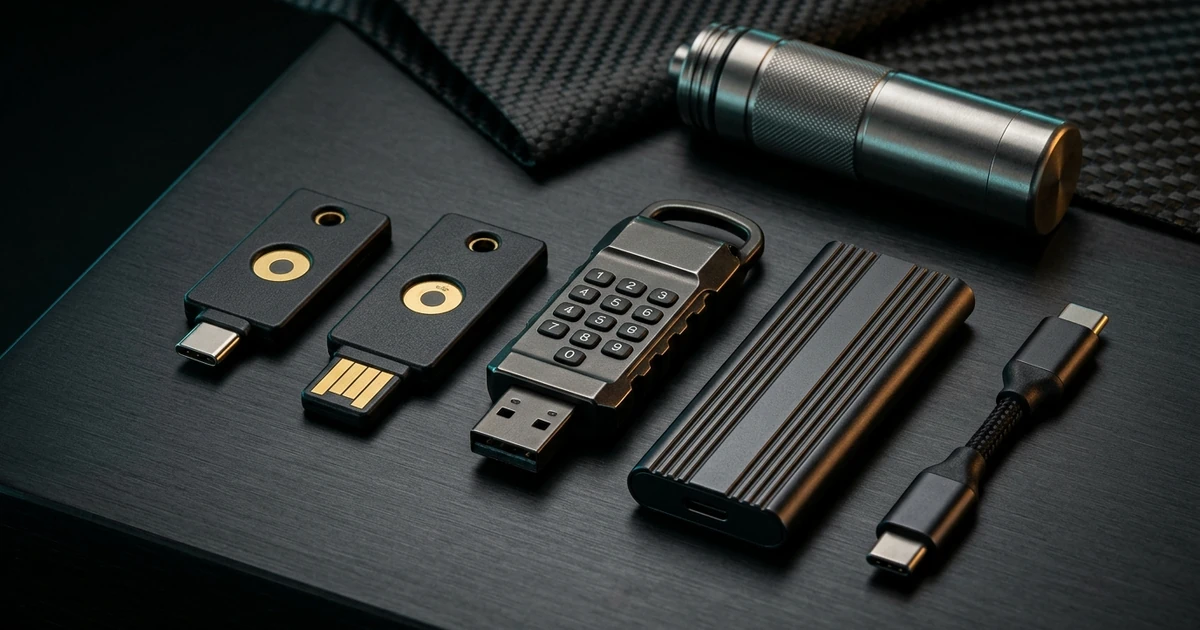
Yubico YubiKey 5C NFC (USB-C + NFC Multi-Protocol Hardware Key)
The universal benchmark for hardware-enforced authentication. Zero moving parts and no internal battery mean it survives rain, washing machines, and years on a keychain. Supports passkeys, domain-locked phishing protection, hardware TOTP codes via Yubico Authenticator, and physical-touch Linux SSH keys. Remember the golden rule: grab two units (or pair one 5C NFC with a USB-A YubiKey 5 NFC) so you always have an enrolled backup at home.
Yubico Security Key C NFC (FIDO2 / WebAuthn & SSH Only Edition)
If you don't store legacy 6-digit TOTP codes inside the key or sign GPG commits—and purely want rock-solid phishing defense for Google, Microsoft, banks, Apple ID, GitHub, and your password manager—the blue Security Key C NFC gives identical FIDO2 cryptographic strength at nearly half the outlay per unit. That makes equipping your spouse or buying a third off-site backup key trivial. Prefer open-source firmware? Inspect the Nitrokey 3C NFC.
Kingston IronKey Keypad 200 (USB-A / USB-C Hardware Keypad Flash Drive)
Unlock with your PIN right in your hand before inserting into any port. The Kingston IronKey Keypad 200 protects internal circuitry with a tough epoxy seal against physical probing, coats its alphanumeric buttons with a fingerprint-resistant polymer layer (stopping smug-attack oil traces on your PIN digits), offers separate Admin + User PINs, and supports Read-Only mode when plugging into untrusted copy-shop or public terminals.
iStorage datAshur PRO2 & Kingston IronKey Vault Privacy 80 SSD
Need rugged field survival for critical recovery installers and audit artifacts? The iStorage datAshur PRO2 slides inside a crush-proof extruded aluminum sleeve rated IP58 against dust and water. Carrying hundreds of gigabytes of cold archives, VM images, or high-resolution photo backups offline? Step up to the touchscreen Kingston IronKey Vault Privacy 80 SSD—complete with randomized keypad layouts to defeat shoulder-surfing.
Waterproof Titanium Key Capsule + Fireproof Document & Spare Key Bag
Even an IP68 YubiKey shouldn't have its USB-C connector exposed to pocket lint, keys, and coins every day—or sit loosely on a wooden desk during a house fire. Tuck your daily key or emergency recovery USB inside a waterproof titanium keychain capsule, and keep your backup key alongside your paper recovery codes and offline IronKey drive inside a dedicated fireproof fiberglass pouch.
5. Engineering Comparison Matrix: FIDO2 Keys, PIN Drives & Physical Armor
| Hardware Model | Category & Interface | Core Security & Resistance | OS / Driver Requirement | Best Fit For | Check Availability |
|---|---|---|---|---|---|
| Yubico YubiKey 5C NFC (x2 Pair) | FIDO2 + TOTP + PGP + PIV (USB-C / NFC) | Anti-AiTM Silicon + IP68 + ed25519-sk |
Zero Drivers (Standard HID/CCID) |
Engineers, SysAdmins & primary multi-protocol accounts | View on Amazon ↗ |
| Yubico Security Key C NFC | Pure FIDO2 / WebAuthn + SSH (USB-C / NFC) | Identical FIDO2 Anti-Phishing + IP68 | Zero Drivers (Standard WebAuthn) |
Budget backup keys, 3rd spare & family accounts | View on Amazon ↗ |
| Nitrokey 3C NFC | Open-Source FIDO2 + PGP + Secrets (USB-C) | Transparent Auditable Firmware + NFC | Zero Drivers (Cross-Platform HID) |
Open-source purists & Linux privacy setups | View on Amazon ↗ |
| Kingston IronKey Keypad 200 | Hardware Keypad USB Drive (USB-A / USB-C) | FIPS 140-3 L3 + AES-256 XTS + 10-Try Wipe | 100% OS-Independent (Pre-Plug Unlock) |
Cold recovery kits, legal docs & locked corporate PCs | View on Amazon ↗ |
| iStorage datAshur PRO2 | Rugged Aluminum PIN USB 3.2 Drive | FIPS 140-2 L3 + IP58 + Epoxy Crypto Chip | 100% OS-Independent (Zero Host Apps) |
Rough field work, ITAD audits & harsh travel | View on Amazon ↗ |
| Kingston IronKey Vault Privacy 80 | Touchscreen PIN External SSD (Up to 7.68TB) | AES-256 XTS + Randomized Touchscreen Digits | 100% OS-Independent USB-C/A Mass Storage |
Massive air-gapped archive & offline VM backups | View on Amazon ↗ |
| Fireproof Pouch + Titanium Capsule | Physical Thermal & Pocket Containment | Waterproof EDC Capsule + Fiberglass Thermal Bag | No Electronics (Physical Fault Tolerance) |
Storing spare YubiKeys, IronKeys & paper recovery codes | View on Amazon ↗ |
🛠️ Complete Zero-Knowledge FIDO2 & Cold PIN Storage Kit
Never get locked out or phished again: always deploy a minimum pair of FIDO2 keys alongside hardware-PIN offline storage and fireproof safekeeping:
6. Frequently Asked Questions (FAQ)
Why are SMS codes and Google Authenticator 6-digit apps no longer phishing-proof?
Modern Adversary-in-the-Middle (AiTM) phishing pages proxy your real login screen in real time. The instant you paste your 6-digit code onto the lookalike URL, the attacker relays it to the true bank or email server and steals the authenticated session cookie. A hardware FIDO2 key checks the cryptographic origin directly inside its chip and refuses to respond on fake domains.
Why should I never buy just one YubiKey?
Removing SMS recovery and relying on a single YubiKey turns losing your keys or having a bag stolen into a multi-week account recovery nightmare. Always enroll at least two FIDO2 keys simultaneously across every primary service: keep one daily unit with you and store the tested spare inside a fireproof bag or safe at home.
What is the difference between YubiKey 5C NFC and the cheaper Security Key C NFC?
Both share the exact same anti-phishing FIDO2/WebAuthn silicon and Linux OpenSSH ed25519-sk support. The black YubiKey 5C NFC adds TOTP code storage (Yubico Authenticator), PGP hardware encryption keys, corporate PIV smartcards, and legacy slots—making the blue Security Key C NFC a budget-friendly choice when you only need passkeys or an extra safe spare.
Why use a hardware-keypad USB drive like IronKey Keypad 200 or iStorage datAshur PRO2 instead of BitLocker?
Because unlocking happens on physical silicone buttons inside an epoxy-protected controller before plugging the drive in. They require zero drivers, work seamlessly on IT-locked corporate Windows machines, Linux boxes, macOS, and bare BIOS screens, hide PINs from software keyloggers, and destroy the internal AES-256 XTS key automatically after 10 wrong guesses.