Hidden Homelab & Storage M.2 / PCIe Adapters: Intel i226-V, ASMedia ASM1166 6x SATA, OCuLink & Bifurcation Traps
Every Tiny/Mini/Micro server or repurposed desktop has dormant bandwidth locked inside M.2 Wi-Fi sockets, spare NVMe slots, and PCIe lanes—yet buying the wrong five-dollar riser breaks Intel C8/C10 sleep, drops ZFS drives under rebuild, or hides three out of four SSDs. Here is how to pick the genuine homelab gems and dodge the hardware traps.
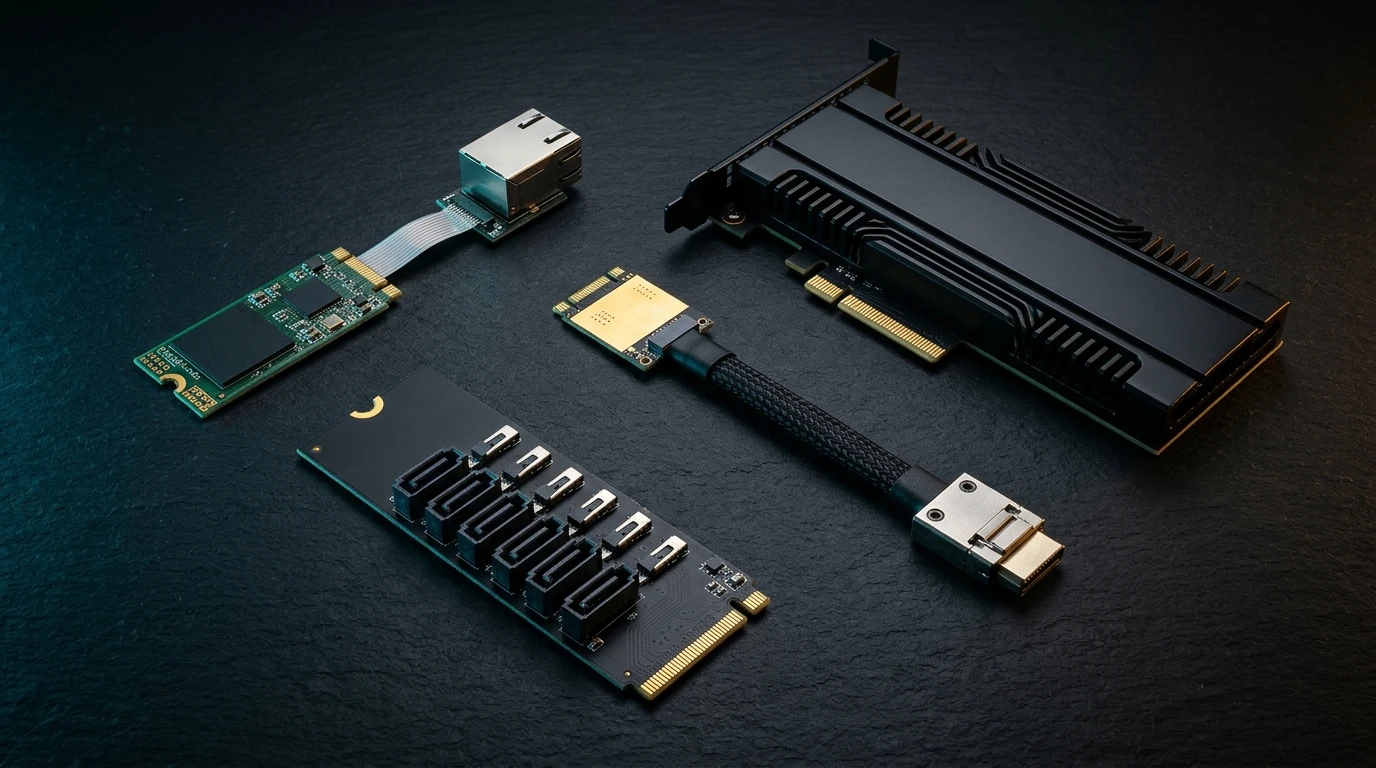
Core M.2, SATA, OCuLink & Enterprise PCIe Adapters That Actually Work
Skip generic mystery-chipset cards. These four proven adapter categories cover dual-NIC OPNsense nodes, compact TrueNAS ZFS storage builds, external OCuLink AI/GPU docks, and multi-NVMe PCIe arrays.
1. M.2 Key-A+E (Wi-Fi Slot) → 2.5GbE RJ45: Turning Single-NIC Mini PCs into OPNsense Routers
Open almost any compact office Mini PC (Lenovo ThinkCentre Tiny, Dell OptiPlex Micro, HP EliteDesk Mini) or repurposed laptop motherboard and you will find a tiny M.2 2230 Key-A+E socket holding an unused Wi-Fi/Bluetooth card. Because standard Wi-Fi modules pull a full PCIe x1 lane from the chipset, you can pop out the wireless card and drop in an M.2 Key-A+E to 2.5GbE RJ45 adapter—instantly turning a one-port box into a dual-NIC OPNsense / pfSense firewall or Proxmox router without touching slow USB Ethernet dongles.
The chipset inside that tiny board matters just as much as in full-size NICs. Choose the Intel I226-V (or proven Realtek RTL8125BG if you only run modern Linux kernels with updated r8125/r8169 drivers), while strongly preferring Intel I226-V for BSD-based firewalls like OPNsense and pfSense where out-of-the-box queue stability and hardware offloading shine. Keep two physical traps in mind before buying:
- The Intel
CNVi / CNVio2Trap: Some modern Intel boards wire their M.2 Key-E Wi-Fi socket strictly with Intel proprietary CNVi traces and leave the standard PCIe data lines disconnected. If your original Wi-Fi module is anAX201orAX211(CNVi), check your motherboard block diagram or test a generic non-CNVi PCIe card (like anAX200orMT7921) first—if a standard PCIe card is invisible, anI226-Vadapter will not enumerate either. - The Flat Ribbon Cable Strain Trap: Almost every M.2 A+E Ethernet kit uses a paper-thin FFC flex ribbon connecting the tiny M.2 PCB to a rear RJ45 bracket. Pinching that ribbon under a sharp stamped metal lid—or twisting it 90 degrees near the connector latch—snaps micro-traces and causes intermittent link drops down to
100 Mbps. Route the ribbon gently in a smooth curve, add a strip of Kapton or electrical tape over sharp chassis edges, and lock down the rear RJ45 bracket tightly with a screw before plugging in stiff Cat6a patch cords.
2. M.2 M-Key → 6× SATA: Why ASMedia ASM1166 Rules Low-Power ZFS Builds (and Why Cheap Cards Fail)
When you want six 3.5-inch HDDs or 2.5-inch SATA SSDs attached to a Mini PC, ITX board, or N100/N305 homelab node that only offers two M.2 NVMe sockets, an M.2 M-Key to 6× SATA adapter feels like magic. Under the hood, however, two chips that look identical in marketplace photos behave like night and day inside a 24/7 server.
1) SATA Port Multipliers (
PMP, e.g., JMB575 or 1-to-5 splitters): They multiplex 4–6 drives onto a single 6 Gbps SATA channel, causing severe bus contention and sudden drive disconnects during ZFS scrubs or TrueNAS resilvers.2)
PCIe x1 4-Port / 6-Port Cards: A PCIe 3.0 x1 card caps total simultaneous throughput around ~985 MB/s—enough to choke 4–6 SSDs or fast HDDs during parity checks.3)
JMicron JMB585 & Marvell 88SE9215 on Low-Power Servers: Both controllers notoriously refuse proper ASPM L1 sleep on many consumer boards, pinning your CPU in Package C2/C3 instead of deep under-15W Package C8/C10!
That is why the ASMedia ASM1166 has earned cult status among low-power TrueNAS and Proxmox builders. It connects over PCIe 3.0 x2 (delivering up to ~1.9 GB/s of real-world aggregated bandwidth—more than enough for six spinning hard drives running concurrently), presents six true native AHCI SATA ports with zero port-multiplier hacks, passes cleanly via IOMMU/VFIO into a TrueNAS VM, and—with clean ASPM-enabled firmware—lets Intel Core and N100/N305 platforms drop comfortably down into Package C8/C10 idle sleep.
One practical pro tip: some bargain-bin green/black ASM1166 boards ship with an older generic factory ROM that leaves ASPM disabled or causes slow drive spin-up detection. Look for reputable revisions (or flash the well-known SilverStone ECS06 / clean ASPM ASM1166 firmware if lspci -vvv shows ASPM Disabled), and stick a low-profile aluminum or copper heatsink on the controller chip because pushing six drives during a ZFS scrub makes that tiny silicon die surprisingly toasty.
| M.2 / PCIe Storage Controller | Upstream Bus & Real Bandwidth | Package C8/C10 & ASPM | TrueNAS / ZFS Verdict |
|---|---|---|---|
ASMedia ASM1166(6× Native SATA III) |
PCIe 3.0 x2 (~1.9 GB/s real total; zero PMP splitting) |
C8/C10 Safe (with clean ASPM-enabled ROM firmware) | Gold Standard for compact <15W homelab NAS and ZFS pools |
JMicron JMB585(5× Native SATA III) |
PCIe 3.0 x2 (~1.9 GB/s real total) |
Often Blocks C8/C10 (commonly stalls at C2/C3) | Usable in performance/always-loaded rigs, poor fit for ultra-low idle wattage |
Marvell 88SE9215 / ASM1061(2–4× Budget SATA) |
PCIe 2.0 x1 (~400 MB/s cap!) |
Poor ASPM + older IOMMU quirks | Avoid: severely bandwidth-starved and prone to reset timeouts |
LSI SAS 9207 / 9300-8i(IT-Mode Enterprise HBA) |
PCIe 3.0 x8 (~7.8 GB/s; supports SAS + SATA) |
Blocks Deep C-States (adds constant idle draw & high heat) | Enterprise Beast for 8–24+ drive racks with server airflow, overkill for 4-bay Mini PCs |
3. M.2 M-Key → OCuLink SFF-8612 (PCIe 4.0 x4): External eGPUs & Enterprise U.2 Cages
If your compact Mini PC lacks a full-size PCIe x16 slot—or you want to mount a dual-slot RTX 3090 / 4090 for local LLMs outside a 1-liter chassis—an M.2 M-Key to OCuLink SFF-8612 adapter unlocks a direct, unbuffered PCIe 4.0 x4 tunnel running up to 64 Gbps (around ~7.0 GB/s usable transfer speed). Unlike Thunderbolt 3/4 or USB4 40Gbps (ASM2464PD), OCuLink skips protocol encapsulation and power delivery altogether, feeding clean PCIe lanes straight into a dock like the Minisforum DEG1 or an external U.2/U.3 SFF-8639 NVMe enclosure. For a full dock-by-dock benchmark, see our OCuLink vs Thunderbolt 5 & USB4 eGPU Docks guide.
Two engineering rules keep an OCuLink build rock-solid instead of burning a port:
- Strict Cold-Plug Rule (Zero Hot-Plug!): OCuLink is raw PCIe copper—not USB. Never plug or pull the
SFF-8612cable while either the Mini PC or the ATX PSU on the eGPU dock is powered on. Always shut down both devices completely before seating or removing the connector. - Signal Integrity & Cable Length: At
PCIe 4.0(16 GT/s per lane), long sloppy extensions trigger Link Downgrades (Gen4 → Gen3orGen2) and WHEA/AER correctable PCIe errors indmesg. Stick to short, shielded50 cmor shorter SFF-8612 cables and checkLnkStaafter boot.
4. Quad / Dual M.2 PCIe Cards & The PCIe Bifurcation (x4/x4/x4/x4) Trap
It happens to almost every homelab builder once: you buy a sleek metal Quad M.2 NVMe PCIe x16 adapter card, populate it with four 4TB NVMe SSDs for a blazing Proxmox Ceph or ZFS mirror pool, drop it into an open PCIe x16 slot—and the BIOS only shows one single SSD.
Here is why: inexpensive Quad M.2 adapters are completely passive wiring boards. They route lanes 0–3 to slot one, lanes 4–7 to slot two, lanes 8–11 to slot three, and lanes 12–15 to slot four. For the CPU to talk to all four drives independently, your motherboard BIOS must support PCIe Bifurcation and you must manually switch that slot from Auto / x16 to x4/x4/x4/x4 (or x8/x4/x4 / Dual x4 on smaller cards). Most budget consumer boards—and many OEM office desktops—lock bifurcation off in firmware.
Passive Bifurcation Card
Requires BIOS x4/x4/x4/x4 support (common on AMD B550/X570/AM5 and workstation/server boards). Delivers full direct CPU bandwidth to all 4 SSDs with near-zero heat or extra idle power.
Active PLX / ASM2824 Switch Card
Carries a PCIe packet switch chip on board so all 4 NVMe drives work even in non-bifurcated x8 or x16 slots. Trade-off: shares upstream bandwidth, runs hot under sustained writes, and blocks deep C-States.
M.2 NVMe → U.2 SFF-8639
Adapts a consumer M.2 slot to accept used enterprise U.2/U.3 SSDs with power-loss protection (PLP) and massive DWPD endurance. Remember: U.2 requires a 12V SATA/Molex power lead on the adapter!
5. Bonus Gems: 10GbE SFP+ NICs, USB4 ASM2464PD & CFexpress Type B
- PCIe x4 →
10GbE SFP+(Intel X520 / X710vsMellanox ConnectX-3 / ConnectX-4 Lx): Used enterprise SFP+ cards cost less than new 10GbE RJ45 cards and sip far less power when paired with passive twinax DAC cables instead of hot 10GBASE-T copper transceivers. For power-conscious builds, preferIntel X710-DA2orMellanox ConnectX-4 Lx(which support modern ASPM and PCIe 3.0/4.0 drivers cleanly) over aging PCIe 2.0X520/ConnectX-3cards—and strap a whisper-quiet 40 mm or 60 mm fan onto the heatsink if your chassis lacks front-to-back server airflow. USB4 40Gbps(ASMedia ASM2464PD) Enclosures: When you have zero free internal PCIe or M.2 slots left, anASM2464PDUSB4 enclosure exposes raw PCIe tunneling over USB-C—allowing real-world NVMe speeds above3.2–3.7 GB/s(about~32–36 Gbpsactual payload) with full SMART telemetry, unlike older10 GbpsUSB-SATA/NVMe bridges.CFexpress Type B→ M.2 2230 NVMe Adapters: Inside camera bodies,CFexpress Type Bcards are physically just PCIex2(or Gen4) NVMe SSDs wrapped in a rugged metal shell. Simple mechanical adapter sleeves let you drop an affordableM.2 2230NVMe SSD into a CFexpress reader or reuse high-endurance CFexpress media as a hot-swappable rugged field-transfer cartridge.- Thermal Throttling Reality Check: Stacking an
ASM1166SATA board or a fast PCIe 4.0 SSD inside a tightly cramped Mini PC or passive Quad M.2 carrier cooks controllers past80–90°Cduring scrubs. Always mount a copper M.2 heatsink with proper 0.5–1.0 mm thermal pads where Z-height permits.
🧪 Interactive M.2 & PCIe Adapter Slot Auditor (100% In-RAM)
Pick the exact physical slot on your host, your expansion goal, and your power target to calculate real PCIe lane bandwidth, C8/C10 sleep safety, bifurcation/wiring traps, and a copyable Linux verification command.
6. Hardware Picks: Proven M.2, PCIe, OCuLink & 10GbE Adapters
M.2 A+E to Intel I226-V 2.5GbE Adapter
Converts a spare laptop or Mini PC Wi-Fi socket into a rock-solid second 2.5GbE RJ45 port with native BSD and Linux kernel support. Verify the slot carries PCIe (not CNVi-only) and route the ribbon smoothly.
ASMedia ASM1166 M.2 NVMe to 6x SATA Adapter
Exposes six real AHCI SATA ports with zero port-multiplier bugs and clean IOMMU passthrough to TrueNAS. Far superior idle power behavior compared to JMicron JMB585 and Marvell controllers.
View on Amazon ↗M.2 M-Key to OCuLink SFF-8612 PCIe 4.0 Adapter & Cable
Delivers full unbuffered Gen4 x4 bandwidth from a compact Mini PC to external AI GPU docks or enterprise U.2 cages, beating USB4 overhead by a wide margin. Always power off before connecting.
View on Amazon ↗Intel X710 / Mellanox ConnectX-4 10G SFP+ Network Card
Modern enterprise SFP+ silicon with clean Linux/Proxmox drivers, SR-IOV, and cooler operation than older X520 cards. Pair with passive Twinax DAC cables and add airflow in silent desktop cases.
View on Amazon ↗🛠️ Complete SpecInfo Homelab Adapter & Thermal Upgrade Kit (Amazon)
All seven verified expansion essentials—from M.2 A+E NICs and C-State-safe ASM1166 storage cards to Quad NVMe bifurcation, U.2 enterprise adapters, and copper NVMe cooling.