2–3× Mini PC Proxmox Clusters & Desktop 10" Mini Racks (DeskPi RackMate): QDevice Quorum & Ceph PLP vs ZFS Guide
How to replace roaring 19-inch enterprise rack irons with a whisper-quiet 10-inch desktop cluster that stays online cleanly: solving the 2-node quorum lost deadlock via Corosync QDevice, why Ceph eats consumer NVMe SSDs lacking PLP capacitors vs clean ZFS replication, and how to wire a neat 10-inch mini rack with shelves, Keystone patching, and power brick management.
- Measure Your Mini PC Width Plus Side Ventilation Clearance: Standard 10-inch rails give roughly
215–220 mmof usable shelf width. Tiny 1L boxes and square Ryzen Mini PCs fit comfortably one-per-shelf; oversized workstations exceeding205 mmneed side air clearance or top-of-rack placement. - Do Not Create a Cluster After Populating VMs on Both Hosts: Proxmox VE requires every joining node (except the first master host) to have zero existing VMs before running
pvecm add— always back up and join empty nodes cleanly first. - Keep Consumer DRAM-Less QLC SSDs Out of Ceph Pools: Installing Ceph onto single M.2 consumer SSDs lacking hardware Power Loss Protection causes brutal latency spikes and premature flash wearout within months.
Loud, deep 19-inch steel cabinets weighing fifty kilograms no longer make sense for home offices, apartments, or compact branch labs. Today, pairing two or three quiet workstation Mini PCs with an open aluminum 10-inch desktop mini rack delivers multi-gigabit clustering, tidy front Keystone patching, and a whisper-quiet footprint — taking up less floor space than a desktop laser printer.
Yet thousands of first-time Mini PC cluster builders trip over the exact same three engineering mistakes during week one: locking themselves out of a 2-node cluster on the very first Windows update reboot, burning out consumer NVMe drives under misapplied Ceph writes, and discovering that three Mini PCs create a spaghetti nest of external power bricks unless planned up front.
1. Choosing Your Mini PC Cluster Pattern Inside a 10" Mini Rack
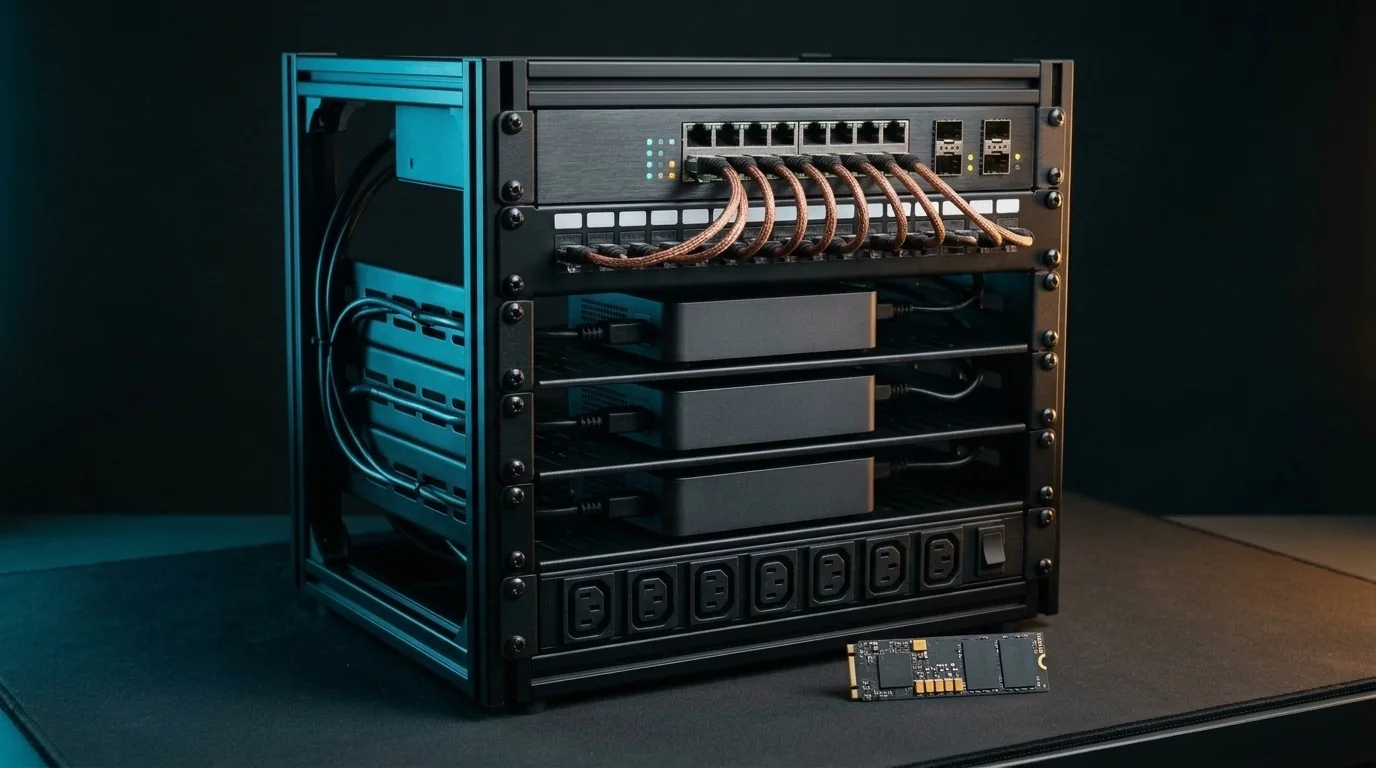
A 10-inch desktop rack (such as the modular aluminum DeskPi RackMate T0 4U, T1 8U, or T2 12U frames) turns loose tabletop nodes and tangled Ethernet adapters into a genuine structured lab. Before buying shelves and switches, pick the cluster philosophy that matches your uptime goals rather than chasing unnecessary distributed complexity.
2× Mini PC + QDevice + ZFS Sync
Pair two dual-NIC Mini PCs (or Ryzen / Intel N-series nodes) with a tiny external Corosync QDevice vote and scheduled 5-to-15 minute pvesr ZFS replication.
- Why it wins: Silent operation, tiny power draw, instant VM snapshots, fast local NVMe speed without network storage overhead, and graceful failover if one Mini PC undergoes maintenance.
3× Nodes (ZFS Mesh or Enterprise Ceph)
Adding a third identical Mini PC removes any external tiebreaker dependency (odd number of 3 votes natively!) and opens the door to either zero-tiebreaker ZFS failover or distributed storage.
- Golden rule: Even with three nodes, stick to ZFS replication unless you run dedicated
10G SFP+links and genuine PLP NVMe enterprise drives on every host.
Ceph on Consumer SSDs & 1GbE
Spinning up Ceph across two Mini PCs or onto cheap DRAM-less consumer M.2 sticks over shared 1GbE switches looks tempting in tutorials — until real database traffic lands.
- What breaks: High CPU wait (
iowait), laggy VM consoles, slow single-thread write throughput, and rapid exhaustion of SSD endurance counters.
2. Trap #1 — The 2-Node quorum lost Deadlock & How Corosync QDevice Fixes It
Picture the classic rookie surprise: you link two shiny Mini PCs into a Proxmox VE cluster, everything turns green in the sidebar, and then you reboot Node 2 after a kernel update. Seconds later, Node 1 freezes your cluster control panel — clicking Start on a VM errors out with cluster not ready - no quorum? (500), and /etc/pve becomes strictly read-only!
Why does one live server refuse to run cleanly? Because distributed clusters protect your shared storage from split-brain (both nodes thinking the other died and corrupting the same VM image simultaneously) by requiring strictly more than half of total votes to stay operational:
- In a 3-node cluster, losing 1 server leaves 2 of 3 votes (clearly above half) → quorum survives.
- In a 2-node cluster, losing 1 server leaves 1 of 2 votes (dead even at half, never strictly greater) → quorum locks cleanly by design!
Typing pvecm expected 1 in the shell unlocks management temporarily during an emergency, but leaves you exposed if typed blindly and resets after reboots. The real, permanent fix takes two minutes: give the cluster a tiny third witness vote called a Corosync QDevice.
- What can act as the QDevice? Anything already powered on cleanly 24/7 outside the two Proxmox hosts — an always-on NAS VM/container, a Raspberry Pi, an Intel N100 home server, or even a tiny Linux router running
corosync-qnetd. It stores zero VM disks and burns almost zero CPU or network traffic; it just answers lightweight "who can see whom" tiebreaker polls.
# 1. On the lightweight external witness host (Debian / Ubuntu / Raspberry Pi):
sudo apt-get update && sudo apt-get install -y corosync-qnetd

# 2. On BOTH Proxmox Mini PC nodes:
apt-get update && apt-get install -y corosync-qdevice

# 3. Run ONCE from Node 1 (replace 192.168.10.50 with your witness IP):
pvecm qdevice setup 192.168.10.50

# 4. Verify 3 total votes (2 physical nodes + 1 QDevice tiebreaker):
pvecm status
3. Trap #2 — Why Ceph Destroys Consumer NVMe Drives Without PLP vs Clean ZFS Replication
Before dropping three consumer PCIe SSDs into a shared Ceph pool inside a Mini PC rack, understand the silent storage physics happening underneath every guest OS write:
| Cluster Storage Engine | How Writes Hit Your NVMe SSDs | Required SSD Hardware Class | Best Mini PC Fit & Real Trade-Offs |
|---|---|---|---|
ZFS Local Mirrors + Scheduled pvesr Replication |
Writes finish straight to fast local NVMe mirrors; async incremental ZFS snapshots copy cleanly across nodes every 5–15 min. | High-TBW TLC NVMe (e.g., WD Red SN700, Kingston KC3000, Samsung 990 PRO). |
Ideal for 90% of 2–3 node Mini PC racks. Maximum guest VM IOPS, silent thermals, near-zero background wear, minimal RAM consumption. |
| Distributed Ceph (3x Replica Shared Storage) | Every single VM block write replicates synchronously across 3 nodes over the network AND hammers RocksDB WAL/DB with constant strict fsync flushes. |
Mandatory Hardware PLP Enterprise NVMe (e.g., Micron 7450 PRO, Kingston DC2000B / DC600M, Samsung PM9A3). |
Only for 3+ nodes with 10G SFP+ uplinks and workloads demanding instant sub-minute automatic VM HA failover with zero data loss window. |
Here is why cheap consumer NVMe drives choke inside Ceph: ordinary desktop/laptop SSDs do not carry tiny golden rows of Power Loss Protection (PLP) tantalum capacitors on their PCB. Whenever Ceph (or ZFS sync writes for databases) sends an fsync safety command asking the SSD to guarantee data is permanently stored, a hardware PLP enterprise drive says "Done!" safely inside milliseconds because capacitors back up its ultra-fast DRAM cache. A consumer drive lacking PLP must bypass speed caches and grind every tiny sync block directly into raw NAND flash — multiplying write wear by several times while driving VM iowait sky-high.
Network Ring Rule: Keep Corosync Heartbeats Off Busy Storage Cables
When ZFS replication (pvesr) or Proxmox Backup Server (PBS) floods a single 1GbE or 2.5GbE port at 100% capacity, fragile Corosync UDP heartbeat packets queue up right behind backup chunks. Miss a handful of heartbeats and Proxmox HA thinks a node died — triggering an unintended self-fence reboot! Always choose dual-NIC Mini PCs (such as GMKtec K8 Plus Dual 2.5GbE or Minisforum MS-01 / MS-A2 Dual 10G + Dual 2.5GbE) so Link 0 handles management/VM traffic while Link 1 acts as a clean secondary Corosync ring or isolated storage trunk.
4. Anatomy of a Clean 10" Mini Rack Build (Shelves, Keystone Patching, PDUs & Power Bricks)
Throwing three Mini PCs and a switch onto a bare shelf still leaves a bird's nest unless every U of your 10-inch cabinet has an assigned physical job. Think from top to bottom cleanly:
- Choosing Rack Height (
4Uvs8Uvs12U): A4U(DeskPi RackMate T0) holds 1 switch, a patch panel, and 1–2 nodes tightly without brick storage. An8Uframe (DeskPi RackMate T1) hits the sweet spot for a 3-node cluster:1Utop fan/vent cap,1U2.5GbE/10Gswitch,1U10-inch Keystone patch panel,3× 1Uvented shelves for three Mini PCs,1U10-inch switched PDU strip, and1Ubottom tray hiding power bricks cleanly. Step up to12U(T2) if you also house an ITX NAS or compact desktop UPS inside the frame. - Taming External
19V / 20VPower Bricks: Mini PCs save chassis space by keeping bulky AC-to-DC bricks outside the box. Strap all three bricks side-by-side onto a perforated bottom1Utray using reusable hook-and-loop Velcro straps (never stack warm bricks on top of each other!), plug short IEC cords or switches into a rear-facing10" Rack PDU, and keep AC mains separated from low-voltage Ethernet bundles. - Keystone Patch Panels &
15–25 cmPure Copper Patch Cords: Mount a10-inch 8-port or 12-port Blank Keystone Panelright beneath your top switch. Terminate rear Mini PC ports cleanly up into the rear Keystones, then loop ultra-short0.15 m–0.25 mflexible Cat6A cords made from 100% bare pure copper (never brittle copper-clad aluminum CCA) on the front face. Every node lights up cleanly and unplugs in one second. - Top Airflow Exhaust: Heat rises vertically inside compact aluminum racks. Leave at least minimal air gaps around switch heatsinks and mount a slow, near-silent
120mmor dual80mm PWMexhaust fan pushing warm air upward out of the top rail.
5. Interactive Proxmox Mini PC Cluster & 10" Mini Rack Planner
Select your node count, storage replication model, and power/cabling approach below to generate a verified rack unit layout, SSD hardware mandate, quorum architecture, and ready-to-paste setup commands.
⚡ Proxmox Mini PC Cluster & 10" Mini Rack Sizer
Check rack U allocation, Corosync QDevice rules, NVMe PLP vs ZFS replication physics, and copyable cluster setup commands.
6. Complete 10" Mini Rack & Proxmox Cluster Hardware Parts Breakdown
Building a tidy 10-inch desktop cluster involves six distinct hardware blocks — from the anodized rack frame and shelves to clean short patch cords, multi-gig switching, power strips, and endurance-rated NVMe SSDs.
DeskPi RackMate T1 (8U) / T2 (12U) 10" Open Rack
Compact desk-friendly 10-inch cabinet engineered specifically for Mini PCs, compact multi-gig switches, and desktop lab stacking with open airflow paths.
Minisforum MS-01 / MS-A2 or GMKtec K8 Plus (Dual NIC)
Gives every cluster host separate ports for Corosync heartbeats and storage sync alongside multi-slot NVMe bays for mirrored boot or ZFS VM pools.
10" 12-Port Keystone Patch Panel + 0.15m Pure Copper Cat6A
Keeps front rack wiring crisp and modular without stiff CCA cables straining Mini PC RJ45 jacks inside tight rear rail depth.
10" Vented 1U Cantilever Shelves + Switched 10" Rack PDU
Supports heavy dual-fan Mini PCs cleanly with underside perforation while letting you power-cycle individual cluster nodes or strap power bricks neatly.
Managed 8-Port 2.5GbE + Dual 10G SFP+ Desktop Switch
Delivers silent wire-speed VLAN separation between office LAN, Proxmox Corosync heartbeats, and high-speed ZFS or PBS backup traffic.
WD Red SN700 (ZFS) or Micron 7450 PRO / DC2000B (PLP Ceph)
Prevents mid-year NVMe wearout lockups: high-TBW TLC drives thrive under ZFS replication while hardware PLP enterprise M.2 drives survive heavy Ceph sync writes.
7. Interactive 10" Mini Rack & Cluster Bill-of-Materials Comparator
Filter between rack frames and shelves, clean 10-inch cabling/power hardware, and endurance-rated cluster compute and NVMe components.
🛠️ 10" Mini Rack & Proxmox Mini PC Cluster Parts Matrix
| Cluster / Rack Component | Format & Electrical Spec | 10" Rack Role | SpecInfo Lab Verdict | Check Store |
|---|---|---|---|---|
| DeskPi RackMate T1 (8U) / T2 (12U) 10" Mini Rack Aluminum Open Desktop Frame |
10" Standard • 8U or 12U Height | Primary structural cabinet housing 2–3 Mini PCs + Switch + PDU | Best modular 8U/12U desktop chassis with open side airflow and clean rail tolerances. | View on Amazon ↗ |
| 10-Inch 1U Vented Cantilever Rack Shelf (2-Pack) Perforated Steel Tray |
10" 1U Width • 200mm Depth | Dedicated breathable shelf per Mini PC + bottom power brick tray | Mandatory perforation under Mini PC bottom intakes and warm external power bricks. | View on Amazon ↗ |
| 10" 12-Port Keystone Patch Panel + 0.15m Pure Copper Cat6A AWG28 Thin Bare Copper |
10" 1U Patch • 100% Bare Copper | Front cluster trunking & dual-NIC Corosync loop organization | Avoids fragile CCA jumpers while keeping short front patch loops ultra-tidy. | View on Amazon ↗ |
| 10-Inch Rackmount PDU Power Strip + Managed 2.5G/10G Switch Switched PDU + VLAN Switch |
10" PDU • 8x 2.5GbE + 10G SFP+ | Clean AC distribution and VLAN traffic isolation for ZFS/Corosync | Pairs silent fanless multi-gig switching with individual power toggles per rack tier. | View on Amazon ↗ |
| Minisforum MS-01 / GMKtec K8 Plus Dual-NIC Mini PC 10G SFP+ or Dual 2.5GbE |
Dual NICs • Multi-M.2 • 64GB+ RAM | Compact silent Proxmox VE compute nodes fitting 10" trays | Dual physical network ports let Corosync and storage traffic stay physically isolated. | View on Amazon ↗ |
| WD Red SN700 (ZFS) / Micron 7450 PRO M.2 PLP (Ceph) High-TBW TLC vs Hardware PLP |
2280/22110 NVMe • Sync Safe | Reliable cluster VM pools resilient against 24/7 snapshot & WAL churn | Select WD Red SN700 for ZFS replication; insist on Micron PLP for Ceph pools. | View on Amazon ↗ |
🧰 Complete 10" Mini Rack & Proxmox Cluster Parts Bundle
Combine a modular 10-inch frame, breathable shelves, Keystone pure-copper jumpers, silent VLAN switching, dual-NIC Mini PCs, and endurance-matched SSDs alongside our laminated A4 Proxmox Cluster Runbooks and SpecInfo Engineering Toolkits:
8. Frequently Asked Questions (FAQ)
Why does a 2-node Proxmox cluster lock up when one Mini PC reboots, and how does QDevice fix it?
Corosync cluster voting requires strictly more than 50% of votes to guard against split-brain data corruption. With only 2 nodes, losing 1 leaves exactly half (1 of 2), forcing Proxmox to lock /etc/pve read-only. Installing corosync-qnetd on an independent lightweight witness (Raspberry Pi, NAS, or compact router node) adds a 3rd tiebreaker vote so either surviving host stays writable cleanly.
Why does Ceph destroy ordinary consumer NVMe SSDs so quickly compared to ZFS replication?
Ceph spreads synchronous replicated block writes alongside heavy RocksDB WAL/DB metadata updates using continuous fsync barriers. Consumer M.2 drives lacking hardware Power Loss Protection (PLP) capacitors must flush small writes straight into flash cells every single cycle, spiking iowait and exhausting TBW ratings fast. Scheduled ZFS replication (pvesr) batches clean incremental snapshots every few minutes without constant sync amplification.
Do standard Mini PCs fit neatly inside a 10-inch DeskPi RackMate mini rack?
Yes — usable inner rack mounting width is roughly 215–220 mm, comfortably accommodating compact N100/N305 nodes, 1L Tiny/Micro office desktops, and Ryzen workstation Mini PCs on vented 1U shelves with cable room left over.
Should Corosync cluster heartbeats share the same cable as ZFS replication or backups?
Separate them whenever possible. Saturating a single shared link with multi-gigabit ZFS or PBS backup streams delays latency-sensitive Corosync UDP votes, risking false HA fencing reboots. Always reserve a second NIC or isolated VLAN strictly for cluster communication.