Silent Cooling for PCs, AI Workstations & Server Racks: Static Pressure (mmH2O vs CFM), CPU Contact Frames & Quiet Switch Mods
Adding louder, faster fans rarely drops temperatures inside a mesh tower, compact NAS, or hallway server cabinet—it just turns your workspace into an airstrip. Real acoustic control comes down to matching static pressure (mmH2O) to tight obstacles, fixing warped CPU sockets with an aluminum Contact Frame, checking pin polarity before silencing screaming 40mm switch fans, and exhausting rising closet heat automatically.
⚠️ ELECTRICAL WARNING BEFORE OPENING MANAGED SWITCHES OR POE RACKS
Managed enterprise switches contain exposed high-voltage AC power-supply rails right next to tiny 40mm fan headers—and many switch makers wire their 3-pin/4-pin fan sockets in a non-standard reverse polarity compared to desktop PC motherboards. Always unplug AC mains, discharge caps before reaching inside, and verify +12V, Ground, and Tach pin order with a multimeter before plugging in replacement fans.
1. Why Fans Spin Faster Yet Everything Stays Hot: Static Pressure (mmH2O) vs Open CFM
Most PC builders shop for cooling fans the exact way people used to shop for cameras: staring at the biggest single number printed on the box—CFM (Cubic Feet per Minute). Here is why that number tricks you almost every time inside a real case or NAS chassis.
Open-air CFM is measured with the fan spinning freely in wide-open air with nothing in front or behind it. Imagine turning on a wide garden sprinkler in an open yard—plenty of water spreads gently outward, zero force behind it. Now try rinsing thick mud out of a dense radiator core or pushing air through a fine nylon dust screen, perforated rack door, and stack of tight hard drives. That wide spray bounces harmlessly backward around the blades and stagnates.
Static Pressure (mmH2O) is the thumb pressed over the garden hose nozzle—measuring how stubbornly a fan keeps air moving forward when an obstacle pushes back. Any fan pressed against a heatsink fin stack, liquid radiator, Jonsbo NAS drive cage, or front dust mesh relies on tight blade-tip clearance and broad overlapping swept blades (like Noctua NF-A12x25 or Arctic P12 Max) rather than skinny, flashy open blades.
Best Behind Mesh, Radiators & Drive Cages
Wide, closely overlapping blades prevent air from slipping backward when blocked by aluminum fins, SSD heatsinks, or dense front dust filters—delivering strong cooling at half the RPM.
Best Moving Warm Air Out Unobstructed Panels
At the top-rear exhaust grille where air meets minimal restriction, gentle wide-diameter 140mm fans move huge volumes silently at calm idle speeds without turbine whistle.
Why Loud Decorative Fans Fail Under Load
Large hollow rings for LED strips shrink actual blade span and leave wide gaps between blade tips and frame—losing airflow pressure the instant they face a front dust filter.
2. Why Modern CPUs Bend Inside Their Socket (and How an Aluminum Contact Frame Fixes It)
Even a massive dual-tower heatsink and high-pressure fan cannot extract heat properly if the copper base plate only kisses the outer edges or raised hump of your processor lid. On modern wide-socket Intel platforms (such as LGA1700), the stock metal retention latch clamps violently across two narrow center points while leaving the top and bottom unsupported. Over weeks of thermal cycling, the thin substrate bends slightly concave—creating a tiny air gap that forces thermal paste to migrate prematurely (the pump-out effect) and pushes peak core temperatures 5°C to 8°C higher.
📐 Engineering Notes: Tightening an LGA1700 / AM5 Contact Frame Safely
- What the Frame Actually Changes: Removing the two-point clamping lever and bolting a precision-milled aluminum frame around all four edges distributes mounting load evenly around the CPU rim. Flatness improves immediately and stays stable for years.
- On AMD AM5 Chips Too: While AM5 processors bend far less dramatically because their IHS is thick and narrow, an AM5 Contact Frame seals the awkward notched perimeter cutouts—preventing spilled thermal grease from creeping underneath onto fragile SMD resistors during repasting.
- Never Wrench It Tight by Force: Over-cranking a contact frame compresses socket pins unevenly and can make memory channel B disappear until loosened! Thread all four corner Torx screws finger-snug first, then tighten in small alternating quarter-turn steps (X-pattern) until you feel gentle metal bottom-out resistance—and stop immediately. Pair with a phase-change pad like Honeywell PTM7950 so you never need to re-paste a workstation again.
3. Silencing Screaming Network Switches & Mini Racks: Noctua 40mm Swap + The Polarity Trap
Nothing ruins a quiet home office or hallway cupboard faster than a managed 10GbE / PoE+ network switch or 1U router fitted with stock 40mm × 20mm sleeve-bearing fans spinning at 9,000–14,000 RPM. Swapping those tiny screamers for acoustic-grade Noctua NF-A4x20 PWM (4-pin) or FLX (3-pin) fans slashes high-pitched whine into a soft whisper—provided you avoid the two silent traps hidden inside network gear.
- Trap #1 — Reversed Header Polarity (Read Before Plugging!): Desktop motherboards standardize on
Pin 1 Ground (Black), Pin 2 +12V (Red/Yellow), Pin 3 Tach (Green/Blue), Pin 4 PWM. Managed switches from brands likeCisco,Netgear,MikroTik, orTP-Linkfrequently shuffle those pins inside identical-looking white sockets! Plugging a standard fan into an inverted header applies reverse voltage and kills the fan driver IC on contact. Always power up the original factory fan carefully with chassis open and probe wire voltages—or map wire colors on the old plug and re-pin/splice using the Noctua OmniJoin kit included inside the box. - Trap #2 — Locked-Rotor RPM Alarms & Minimum Airflow on Heavy PoE: Some switch firmware panics with red fault LEDs or throttles ports if the tachometer pulse drops below a factory RPM floor—stick with the full-speed Noctua connection first rather than adding a Low-Noise Adapter unless exhaust temperatures stay comfortably mild under your real PoE wattage load.
- Trap #3 — Stepped Hysteresis Over Jagged Linear Curves: Never set a 45°C → 80°C straight diagonal slope in BIOS or
fancontrol! Every short Git build or Proxmox VM launch spikes CPU cores briefly for two seconds, making fans surge up and drop back down incessantly like a revving scooter. Program a flat idle plateau up to ~62°C paired with a 3–5 second step-up / step-down delay (hysteresis) so brief background bursts glide by completely silently.
4. Interactive Blueprint: Static Pressure, Hysteresis & Rack Fan Sizing
Pick your chassis type, continuous heat load, and acoustic target below. All tuning blueprints and Linux/BIOS fan-curve templates run cleanly in local browser RAM with zero server tracking.
❄️ Interactive Silent Cooling & Rack Airflow Architect
Client-Side RAM • mmH2O & Hysteresis Planner# Calculating exact acoustic & Linux thermal commands...
5. Recommended Silent Cooling Hardware (Amazon Associates UK / EU / US OneLink)
Skip mystery white-label bearings that start rattling after four months of 24/7 service. Filter below between high-pressure chassis multipacks, 40mm switch fans with OmniJoin adapters, CPU contact frames, and enclosed cabinet exhaust panels:
| Hardware Component | Category & Strength | Best Real-World Use Case | Key Engineering Tip | Check Options |
|---|---|---|---|---|
| Arctic P12 Max / P12 PWM PST (5-Pack) | High Static Pressure • Daisy-Chain | Multi-fan mesh towers, AI rigs & NAS cages | Link fans via PST pigtails; keep idle below 40% PWM | View on Amazon ↗ |
| Noctua NF-A12x25 PWM / chromax.black | 0.5mm Tip Clearance Sterrox LCP | Zero-rattle silent office workstations & thick radiators | Reference acoustics across low, medium & high restriction | View on Amazon ↗ |
| Noctua NF-A14x25 G2 / NF-A14 PWM | 140mm Low-RPM High Displacement | Quiet front intakes & unobstructed rear/top exhaust | Lower pitch than 120mm fans moving identical air volume | View on Amazon ↗ |
| Noctua NF-A4x20 PWM / FLX (40x20mm) | Includes OmniJoin + Low-Noise Adapter | Quieting screaming 10G/PoE switches, routers & Jonsbo NAS | Check switch header pin polarity with multimeter first! | View on Amazon ↗ |
| Noctua NA-FC1 / ARCTIC 10-Port Fan Hub | Manual Speed Dial & SATA PWM Split | Controlling server chassis bays or tuning mini-rack blowers | SATA-powered hubs avoid overloading motherboard fan headers | View on Amazon ↗ |
| Thermalright Phantom Spirit 120 SE | 7-Heatpipe Dual Tower Air Cooler | Rivals 240mm AIOs with zero pump buzz or leak risk 24/7 | Pair with Contact Frame & flat fan plateau up to 62°C | View on Amazon ↗ |
| Thermalright LGA1700 / AM5 Contact Frame | CNC Machined Aluminum Socket Frame | Eliminates uneven ILM socket bowing & paste overflow | Tighten gently in alternating quarter-turns—never force | View on Amazon ↗ |
| AC Infinity CLOUDPLATE / AIRPLATE Exhaust | Thermal Probe + Dual-Ball Bearings | Automated top exhaust for 10"/19" cabinets & media closets | Mount at ceiling rear to stop hot air pooling above switches | View on Amazon ↗ |
| Magnetic Nylon Dust Mesh + PTM7950 Pad | Ultrafine Filter & Phase-Change TIM | Quick-wipe intake dust defense & permanent direct-die paste | Use fine woven nylon filters (far less restrictive than foam) | View on Amazon ↗ |
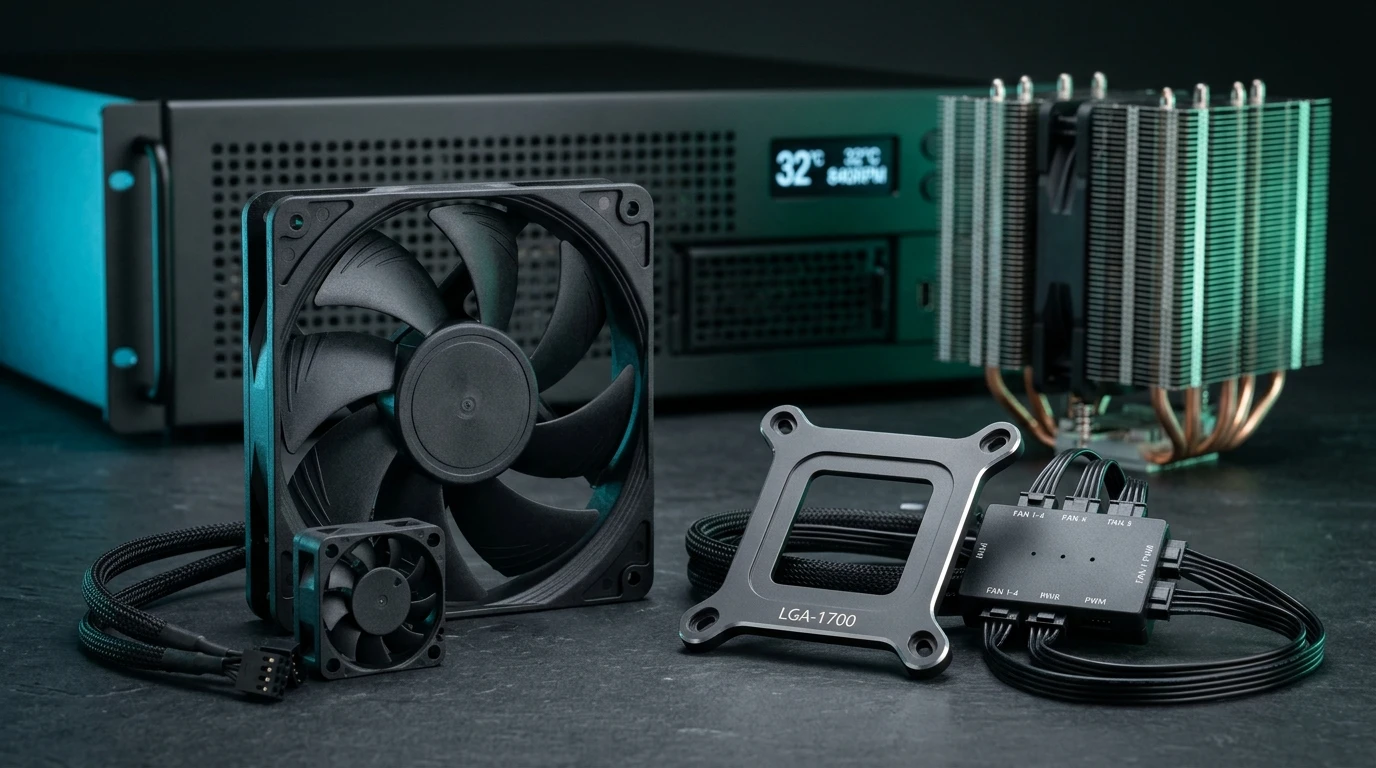
❄️ Complete Silent Workstation, Switch & Rack Cooling Kit
Combine high-static-pressure fan multipacks, a flat CPU contact frame, pin-safe 40mm Noctua blowers, and automated top-rack exhaust for cool, library-quiet hardware:
6. Frequently Asked Questions (FAQ)
Why do high-CFM RGB case fans still leave my PC or NAS hot behind a dust mesh?
Retail CFM numbers are measured in empty air with zero resistance. Thin decorative blades stall as soon as they press against a mesh filter, dense hard-drive cage, or radiator fin stack—sending air swirling backward around the frame. High static-pressure blades rated in mmH2O punch cleanly through tight restrictions at far lower noise levels.
Can plugging a Noctua 40mm fan straight into a PoE network switch burn out the fan?
Yes—if the wire order differs. Desktop motherboards follow a consistent 3-pin/4-pin layout, whereas many managed switches flip +12V, Ground, or Tach pins inside identical-looking white sockets. Always test pins on the stock switch fan with a multimeter first and swap wire order cleanly using Noctua's included OmniJoin splice adapters.
Does an aluminum CPU contact frame actually lower temperatures compared to the factory latch?
On wide Intel LGA1700 sockets that bend under two-point stock retention clamps, replacing the latch with a flat machined contact frame typically drops peak load temperatures by 5°C to 8°C while eliminating uneven thermal paste squeeze-out. On AMD AM5, it mostly serves as an ultra-clean barrier keeping thermal paste out of sensitive PCB cutouts.
Why should warm exhaust exit the top of a hallway network cabinet rather than blowing cold air in from the top?
Heated air naturally climbs to the roof of any cabinet or closet. Pulling exhaust out the upper rear draws cool ambient air smoothly across bottom UPS batteries, NAS drives, and stacked switches—avoiding pocketed heat traps that cut sealed lead-acid UPS battery life dramatically.