5G / LTE Multi-WAN Failover Routers, Directional MIMO Antennas & Tailscale CGNAT Bypass Guide
Why basic routers fail to detect street fibre cuts, how active Ping Watchdogs (GL.iNet Spitz AX / Teltonika RUTX50 / OpenWrt mwan3) switch your entire house to a 5G SIM card in under 3 seconds, how to beat triple-glazed Low-E window reflection with an external 4x4 MIMO antenna, and how to bypass mobile operator CGNAT using Tailscale.
1. Why Standard Routers Don't Notice When Your Fibre Internet Dies (The "Heartbeat Watchdog" Rule)
Imagine you are in the middle of an important client presentation or deploying code to a server when a construction crew two streets away slices through your neighbourhood's optical fibre trunk. Your internet stops working immediately — yet if you look at your standard home router, the "Internet / WAN" light is still glowing solid green.
Why doesn't a normal router switch to backup internet automatically? Because basic routers only check physical cable presence. Since the short Ethernet patch cable between your fibre box (ONT) on the wall and your router is still plugged in and powered on, the router assumes everything is fine.
🟢 Active Ping Watchdog (OpenWrt mwan3 / RutOS)
- How it detects outages: Sends a tiny ping packet every 1–2 seconds through the fibre line to
1.1.1.1and8.8.8.8. - Cutover speed: After 3 missed heartbeats (~2.5 to 3 seconds), it declares fibre dead and switches the whole house to 5G/LTE.
- Automatic Failback: Quietly tests the fibre line in the background and switches back once fibre is stable for 30 seconds.
🔵 WAN2 Cellular Bridge Mode (For UniFi / pfSense)
- How it works: A compact modem (
Netgear LM1200orCudy P5) passes the raw SIM IP straight into your existing router'sWAN2port. - Zero Wi-Fi changes: Keep your existing Ubiquiti UniFi, OPNsense, or ASUS mesh network untouched.
- Best for: Adding a plug-and-play SIM card slot to an existing multi-WAN firewall.
🔴 Smartphone Wi-Fi Hotspot Tethering
- Why it fails: Wired desktop PCs, Proxmox servers, NAS boxes, and PoE cameras have no way to join your phone's Wi-Fi hotspot.
- Battery degradation: Continuous 5G tethering heats the phone battery above 44°C and drains it in under an hour.
- When you are away: If fibre drops while you are travelling, nobody is home to turn on a phone hotspot!
2. The Triple-Glazed Window Trap: Why You Need an External 4x4 MIMO Antenna
A very common frustration happens right after unboxing a new 5G router: you put the router on your desk — or even right on the indoor windowsill — run a speed test, and get disappointing speeds, while stepping two metres outside onto the balcony gives you blazing-fast 5G.
Why does this happen? Almost all modern double- and triple-glazed windows are coated on the inside with an invisible microscopic layer of metal oxides called Low-E (Low-Emissivity) thermal coating. That metallic film is fantastic at reflecting heat back into your room during winter — but to high-frequency 5G radio waves, a modern window acts like a silver mirror or a Faraday cage, blocking up to 90% of the high-speed signal before it ever enters your room.
- What
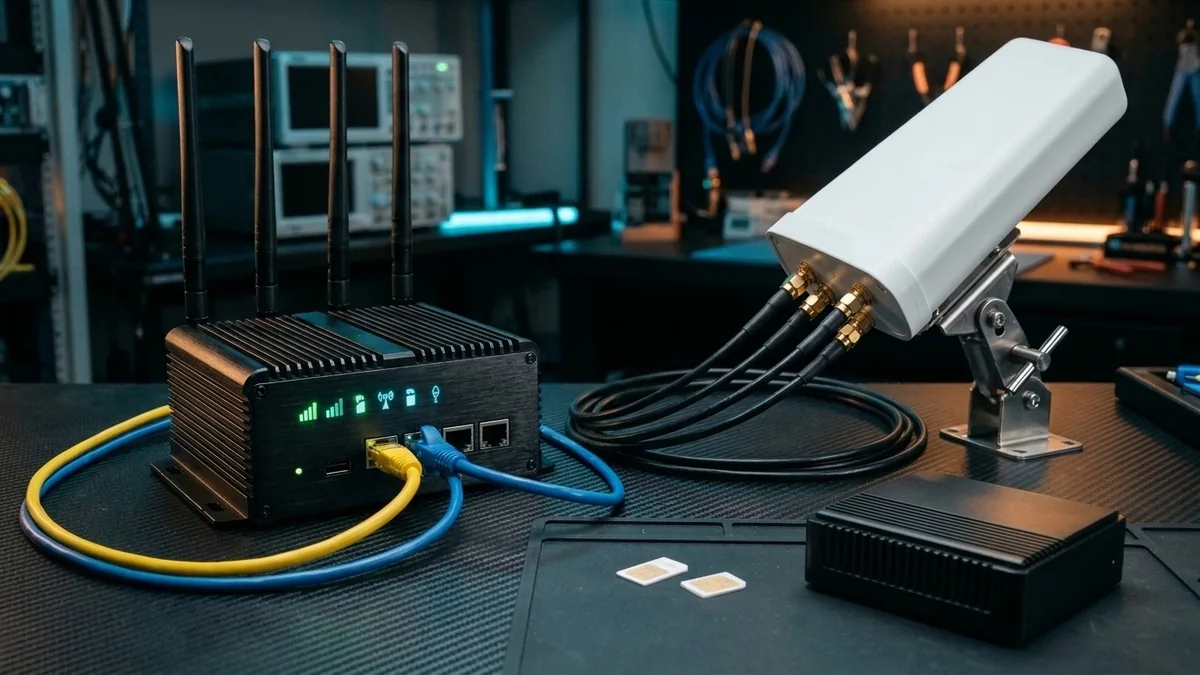
4x4 MIMOMeans in Plain English: Instead of sending data down a single radio lane, modern 5G towers use four separate signal lanes at the same time (4x4 MIMO), angled diagonally like an "X" so they don't interfere with each other. That is why a true 5G external antenna (like the Poynting XPOL-2-5G or XPOL-1-5G) has 4 separate cables inside one weatherproof box. Connecting all 4 SMA ports on your router gives you a 4-lane highway instead of a 1-lane road. - Keep the Antenna Cable Short (Under 5 to 10 Metres): High-frequency 5G signals lose strength quickly as they travel down thin coaxial cables. If you buy a cheap 15-metre thin cable, the cable itself will eat up all the signal gain your antenna just captured! Mount the router near the window or in the loft so a 5-metre low-loss cable reaches outside cleanly — or use flat SMA window pass-through ribbon cables to run the cable through a closed window gasket with zero drilling.
3. Interactive 5G / LTE Multi-WAN Failover, Antenna & Downtime Planner (#multiwan-5g-configurator)
Select your primary use case, indoor signal conditions, cable run length, and currency below to get the exact router + antenna recommendation, 24/7 standby power cost, and ready-to-copy Tailscale CGNAT bypass commands:
🛰️ 5G / LTE Multi-WAN Failover & Antenna Configurator
100% RAM Client-Side • Multi-Currency Downtime & Power Audit# 1. Bypass Mobile SIM CGNAT via Tailscale Subnet Router (Linux / Proxmox LXC / GL.iNet): echo 'net.ipv4.ip_forward = 1' | sudo tee -a /etc/sysctl.d/99-tailscale.conf echo 'net.ipv6.conf.all.forwarding = 1' | sudo tee -a /etc/sysctl.d/99-tailscale.conf sudo sysctl -p /etc/sysctl.d/99-tailscale.conf sudo tailscale up --advertise-routes=192.168.1.0/24 --accept-dns=false # 2. Verify Active Multi-WAN Ping Health Check Status on OpenWrt / GL.iNet: mwan3 status # Recommended Watchdog Targets: 1.1.1.1 and 8.8.8.8 (Interval: 1s, Down after: 3 lost pings)
4. Engineering Comparison Matrix: Best 5G & LTE Failover Routers, Bridges & MIMO Antennas
📊 5G / LTE Multi-WAN Failover Routers, WAN2 Bridges & 4x4 MIMO Antenna Hierarchy
| Model / Device Class | Modem & Throughput | External Antenna Ports | Failover & CGNAT Tools | Best Engineering Use Case | Check Availability |
|---|---|---|---|---|---|
| GL.iNet Spitz AX (GL-X3000) | Quectel RM520N-GL 5G NR Sub-6 SA/NSA + Wi-Fi 6 |
4× SMA (4x4 MIMO) Cellular + 2× RP-SMA Wi-Fi | OpenWrt mwan3, Dual-SIM, Built-in Tailscale & WireGuard |
Flagship Remote Work & Homelab 5G Primary/Failover Router | View on Amazon ↗ |
| Teltonika RUTX50 / RUTM50 Industrial 5G | Industrial 5G Sub-6 (3.3 Gbps DL / Cat 20 LTE) |
4× SMA (4x4 MIMO) + 2× Wi-Fi + 1× GNSS GPS | RutOS SLA Ping Watchdog, Dual-SIM Auto-Switch, 9–50V DC |
24/7 Server Racks, Proxmox Clusters & B2B Commercial Sites | View on Amazon ↗ |
| Cudy P5 (AX3000 5G Dual-SIM) | 5G NR SA/NSA + Wi-Fi 6 (2.5Gbps / 1Gbps WAN) |
4× Detachable SMA Cellular Antennas | WAN/SIM Failover, Band Locking, WireGuard / ZeroTier | Best-Value Home Office 5G Backup & Rural Broadband | View on Amazon ↗ |
| Netgear LM1200 / Teltonika RUT241 | 4G LTE Cat 4 (150 Mbps, ultra-low <4.5W draw) |
2× SMA / TS-9 (2x2 MIMO) External Ports | Pure IP Passthrough Bridge into UniFi / pfSense WAN2 |
Adding a Low-Cost SIM Failover Line to an Existing Gateway | View on Amazon ↗ |
| Poynting XPOL-2-5G / XPOL-1-5G Antenna | 698–3800 MHz Cross-Polarized 5G Panel (IP65) |
Twin / Quad Low-Loss Coax with Gold SMA Plugs |
Bypasses Triple-Glazed Low-E Window Attenuation |
Tripling 5G Upload/Download Speeds from Balcony, Wall, or Pole | View on Amazon ↗ |
5. The Mobile Operator CGNAT Trap (And How Tailscale Solves It in 2 Minutes)
Suppose your fibre goes down while you are away from home, and your router cleanly switches over to its backup 5G SIM card. Your smart home hub and NAS still have internet access — yet suddenly you cannot connect back into your home VPN or security cameras from your phone anymore. Why?
Because almost all consumer mobile SIM cards use CGNAT (Carrier-Grade NAT). Think of CGNAT like living in a large apartment building that only has one shared reception phone number. You can dial out to anyone in the world without a problem, but if someone tries to call you from the outside using that shared public IP address, the mobile operator's exchange has no idea which of the 500 customers sharing that IP the packet belongs to — so it drops the connection.
🔓 How a Tailscale Subnet Router Punches Straight Through Mobile CGNAT
Instead of trying to open ports from the outside in, enable Tailscale (built natively into the web menu of GL.iNet Spitz AX and Teltonika RutOS, or running in a tiny container on your Proxmox/NAS server) with Subnet Routing (--advertise-routes=192.168.1.0/24). Because your home router initiates an outbound encrypted WireGuard tunnel to Tailscale's coordination servers, it punches cleanly through CGNAT on any prepaid or contract SIM card — giving you full remote access to every local IP address (cameras, Proxmox, NAS, KVM-over-IP) without paying a mobile carrier for a business static IP.
6. Detailed Hardware Breakdown & Field Notes
GL.iNet Spitz AX (GL-X3000) Wi-Fi 6 + Dual-SIM 5G NR Failover Gateway
The GL.iNet Spitz AX (GL-X3000) combines a top-tier Quectel RM520N-GL 5G modem with full OpenWrt flexibility. Its visual Multi-WAN dashboard lets you set your primary fibre on the 2.5GbE WAN port and two different mobile operators in the Dual-SIM slots, with 1-second ping health checks, manual 5G tower band-locking (n78 / n28), and 1-click Tailscale Subnet Routing built right into the admin panel.
Teltonika RUTX50 / RUTM50 Industrial 5G Dual-SIM Multi-WAN Router
Built in Europe for 24/7 mission-critical infrastructure, the Teltonika RUTX50 (and compact 4G LTE Teltonika RUT241) can be powered directly from a 12V/24V/48V DC battery bank without inverter conversion losses. It supports SMS remote reboot commands, industrial DIN-rail mounting, and instant SLA failover across Gigabit WAN and Dual-SIM cellular interfaces.
Poynting XPOL-2-5G (Directional Panel) & XPOL-1-5G (Omni 4x4 MIMO) + Flat Window Ribbons
Moving your antenna from the indoor side of a modern Low-E coated window to the outside wall or balcony rail typically boosts 5G signal quality and upload speeds by 200% to 400%. Choose the Poynting XPOL-1-5G (4x4 MIMO) for urban/suburban walls without aiming, or the high-gain directional Poynting XPOL-2-5G for distant rural masts. Pair with Flat Window Pass-Through SMA Ribbon Cables to feed the coax through a closed window frame without drilling a single hole.
🛒 Complete SpecInfo 5G Multi-WAN Failover & MIMO Hardware Kit (Amazon OneLink)
Jump directly to verified 5G/LTE Multi-WAN routers, WAN2 cellular bridges, Poynting 4x4 MIMO outdoor antennas, and no-drill window pass-through cables:
7. Frequently Asked Questions (FAQ)
Will my Zoom or Microsoft Teams call drop when Multi-WAN switches from Fibre to 5G?
With an active 1-second ping watchdog (3 missed pings = ~2.5 to 3 seconds cutover), modern video conferencing apps (Zoom, Teams, Google Meet) experience a brief 2-to-4-second audio pause while renegotiating your new public IP address, and then resume the call automatically without kicking you out of the meeting room.
How do I stop Windows Update or Steam from burning through my backup SIM data cap during an outage?
Because a 2.5-second failover happens transparently inside the router, your desktop PCs do not realize they are now running on a mobile SIM card. In OpenWrt / GL.iNet firewall rules, block bulk update and cloud backup domains (*.windowsupdate.com, *.steampipe.akamaized.net) strictly when packets exit via the cellular wwan0 interface, leaving video calls, SSH, and web browsing completely unrestricted.